Your Guide to Top UI and UX Design Courses
Your Guide to Top UI and UX Design Courses
You can have the most brilliant app idea in the world, but it’ll fall flat if your users find it confusing or frustrating to use. Even the most powerful features are dead in the water if nobody can figure them out. That’s why investing in quality UI and UX design courses is the surest way to turn a merely functional app into an engaging, intuitive tool that people actually want to use.
Why Investing in UX and UI Design Is a Game Changer
Imagine a high-performance sports car, but the dashboard is a baffling mess of unlabelled buttons and cryptic symbols. You’ve got all that power under the bonnet, but no way to control it. That’s exactly what happens when a technically solid app is let down by poor design. Great UI/UX isn’t just about making things look pretty; it's a core business strategy that directly shapes your bottom line by making your app indispensable.
This is especially true for apps built with powerful frameworks like Flutter. While Flutter’s performance is incredible, you only unlock its true potential when you pair it with a seamless user journey. A thoughtfully designed interface means users can navigate features, complete tasks, and enjoy every single interaction without a second thought.
The Growing Demand for Design Excellence
It’s clear the market has caught on. In the UK, the demand for skilled designers has exploded, with UX design job postings jumping by 24% over the last four years. This isn’t just a passing trend; it’s a clear signal that companies prioritising intuitive digital experiences are the ones pulling ahead.
Investing in UX isn't an expense; it's a direct investment in customer satisfaction and retention. A single design improvement can reduce user frustration, decrease drop-off rates, and significantly boost engagement, turning casual users into loyal advocates.
This surge in demand means finding professionals who are properly trained in modern design principles is more critical than ever. When your team truly understands how to create intuitive flows and visually appealing interfaces, the results speak for themselves. A poor user experience can be seriously costly, and as our guide on how bad app design could be costing you customers explains, this investment is no longer optional.
From Functionality to Loyalty
At the end of the day, the goal is to build an app that feels like a natural extension of your user's life. Good design removes friction, builds trust, and creates a positive emotional connection with your brand.
By investing in UI and UX design courses, you're not just teaching your team to make things look good. You're giving them the tools to build an experience that drives customer loyalty and sustainable growth. To get a better sense of the wider business impact, you can explore more about the compelling reasons to invest in design.
What You Will Actually Learn In a UX and UI Course
Jumping into a UX and UI design course can feel a bit like learning a new language. You'll see a curriculum packed with terms that sound abstract, but trust me, every single module is designed to teach a practical, real-world skill for building apps people actually want to use. Think of it less like a university lecture and more like an apprenticeship in understanding human behaviour.
A huge part of any decent course is hammering home the distinction between UX and UI and clarifying their roles, skills, and processes. They are completely intertwined, of course, but they represent different, equally critical, stages of the design journey. UX is the strategic blueprint for the entire experience, while UI is the visual execution of that plan.
Uncovering User Needs Through Research
The first skill you’ll almost certainly dive into is user research. This isn't about firing off generic surveys and crossing your fingers. It’s about becoming a bit of a detective, using techniques like interviews, observation, and creating personas to dig deep and uncover the hidden needs and frustrations of your target audience.
For a Flutter app, this means getting to grips with what users on both iOS and Android expect from their mobile experience. Solid research stops your team from building features nobody asked for, saving a massive amount of time and money. It's the foundation for every successful app, making sure you solve a real problem for a real person.
Structuring Information for Intuitive Navigation
Once you know what your users want, the next puzzle is organising all the app's content in a way that just makes sense. This is called Information Architecture (IA). Imagine trying to find a book in a library where nothing is categorised—that's what an app feels like without a solid IA.
This skill involves creating logical flows and hierarchies, often brought to life through sitemaps and user flow diagrams. The entire goal is to make sure users can find what they need with the least amount of effort. In a Flutter app, this translates directly into a navigation structure that feels completely natural, guiding users from one screen to the next without a hint of confusion.
To really understand how these skills translate into app development, let's break down the core components you'd learn in a comprehensive course and see how they directly benefit a project.
Core Skills Gained In a Comprehensive UX and UI Course
This table breaks down the essential skills taught in UI and UX design courses and explains their direct business impact on app development.
| Skill Area | What It Is | Impact on Your Flutter App |
|---|---|---|
| User Research | Investigating user behaviours and needs through interviews, surveys, and analysis. | Prevents building the wrong features, ensuring your app solves a genuine user problem. |
| Information Architecture (IA) | Organising and structuring content in an intuitive way. | Creates logical navigation that reduces user frustration and makes the app easy to use. |
| Wireframing & Prototyping | Creating low-fidelity blueprints and interactive mock-ups of the app. | Allows for early user testing and feedback, saving significant development costs down the line. |
| Visual Design | Applying colour theory, typography, and branding to create an appealing interface. | Defines the app's personality and builds a strong, recognisable brand identity. |
| Usability Testing | Observing real users interacting with a prototype to identify issues. | Uncovers hidden pain points and validates design choices before coding even begins. |
Each of these skills builds on the last, forming a complete process for creating user-centred designs that work.
From Blueprints to Visuals: Wireframing and Visual Design
With the structure mapped out, it’s time to start building the visual framework. The process kicks off with wireframing—creating simple, low-fidelity, black-and-white layouts of each screen. A wireframe is basically an architectural blueprint; it focuses purely on layout and function, deliberately ignoring colour and style to get the core structure right first.
Think of a wireframe as the skeleton of your application. It’s not meant to be beautiful, but it must be structurally sound. Getting this stage right ensures that when you add the visual layer (the UI), it’s built on a solid, user-tested foundation.
Once the wireframes are solid, visual design comes into play, and the app's personality truly comes to life. This is where you'll learn all about colour theory, typography, spacing, and how to create a cohesive visual language. For us, this means designing interfaces that take full advantage of Flutter's expressive capabilities to create beautiful, high-performance apps that feel both unique and familiar to the user.
Bringing Designs to Life with Prototyping and Testing
The final core skills are all about creating interactive mock-ups and putting them in front of real people. Prototyping is like building a functional model of a house before you start laying bricks. You create clickable, interactive versions of the app that look and feel real, which is brilliant for spotting usability issues early.
This flows directly into usability testing, where you watch actual users interact with your prototype. This stage is absolutely crucial for validating your design decisions. You'll learn how to spot where users get stuck, what confuses them, and what delights them, giving you priceless feedback before a single line of code is written. This loop of building, testing, and refining is what really separates the good apps from the great ones.
Choosing Your Learning Path
So, you've got a handle on the core skills that make up UI and UX. What's next? The logical step is figuring out the best way for you or your team to actually learn them. The world of UI and UX design courses is huge, with different formats built for different goals, budgets, and timelines. Making the right call here is a big deal, as the learning environment seriously affects how well these new skills stick.
Think of it like planning a trip. Are you after a flexible, self-guided tour where you call the shots? A high-speed train straight to your destination? Or a deep, scenic expedition that covers every single landmark along the way? Each route offers a totally different experience, and the best one depends entirely on where you're trying to go.
To help you decide whether your main goal is to build a new idea from scratch or fix an existing problem, this simple decision tree can get your thoughts organised.
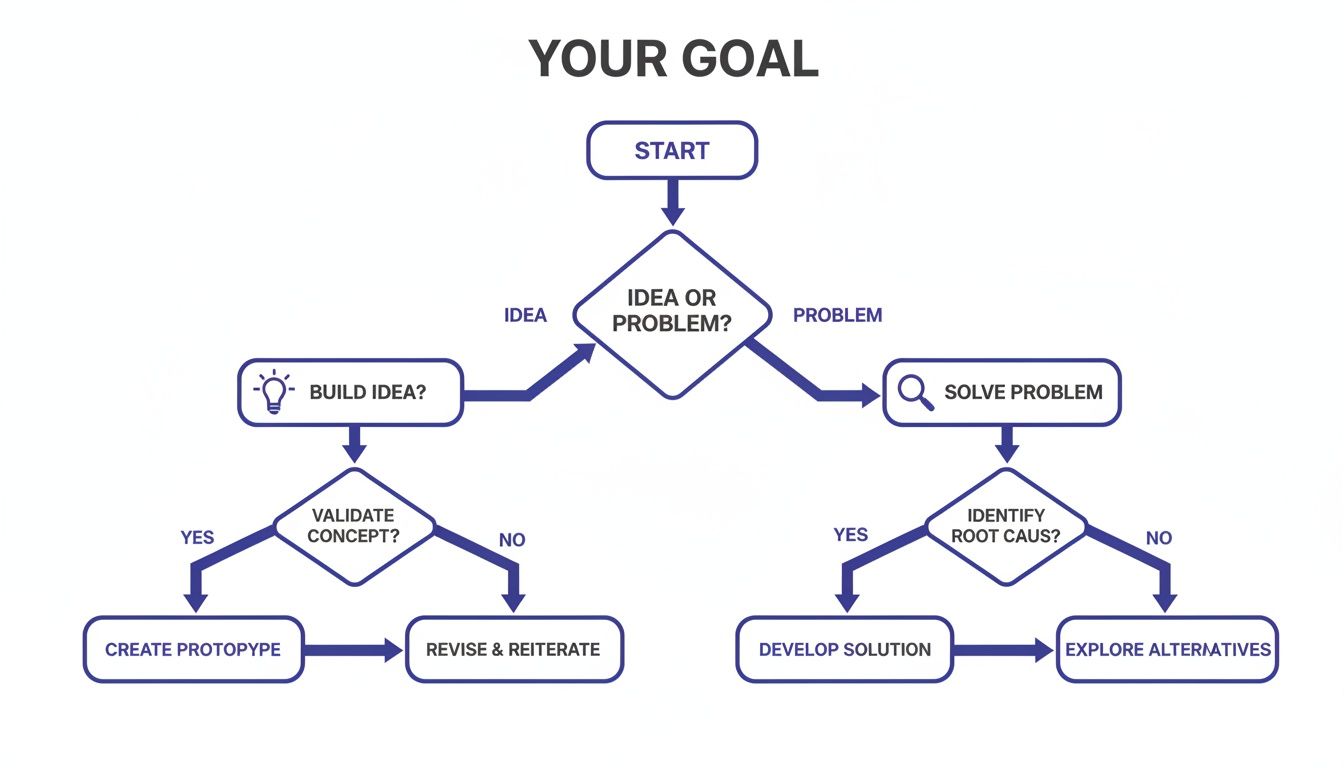
As the flowchart shows, your primary objective—whether that’s innovation or optimisation—should be the starting point. With that in mind, let’s explore the three main pathways available.
Online Courses: The Flexible Route
Online courses are easily the most accessible and flexible option out there. This makes them a fantastic choice for individuals and teams who need to slot learning around their day-to-day work. They offer a self-paced environment, letting learners either dive deep into specific topics or get a broad overview of the field, all without the rigid structure of a classroom.
This flexibility is their greatest strength. A developer could spend an afternoon getting to grips with prototyping tools, while a project manager might focus on user research methods over a few weeks. It's the perfect format for targeted upskilling or for anyone just dipping their toes into the world of design. If this sounds like a good fit, you can find more detail in our breakdown of the top online UX design courses in the UK.
The flip side, of course, is that this freedom demands a lot of self-discipline. Without firm deadlines or a tutor chasing you, it's all too easy for progress to grind to a halt. Quality can also be a mixed bag, so you need to do your homework to make sure the curriculum is current and genuinely useful.
Immersive Bootcamps: The Fast Track
If the goal is to switch careers into a design role or get a team member skilled up and job-ready fast, an immersive bootcamp is often the most direct route. These are intense, highly structured programmes that typically run from a few weeks to several months. They’re designed to mimic a real-world work environment, with a heavy focus on practical, project-based learning.
The key advantage of a bootcamp is the speed and career focus. Students work on projects that are good enough for their portfolios, collaborate in teams, and get direct feedback from industry professionals. This hands-on approach ensures graduates don't just know the theory; they know how to apply it from day one.
Bootcamps are the high-speed trains of design education. They’re built for one purpose: to get you from beginner to proficient practitioner as quickly and efficiently as possible, with a laser focus on the practical skills employers are looking for right now.
The main drawback is the significant investment of both time and money. A full-time bootcamp requires you to put everything else on hold, which just isn't possible for everyone. The blistering pace can also feel overwhelming for some, leaving little room to properly digest complex ideas.
University Degrees: The Deep Dive
For anyone looking for a deep, theoretical grounding in design principles, human-computer interaction, and research methods, a university degree is still the gold standard. A bachelor's or master's degree provides a comprehensive, academic foundation that goes way beyond just learning how to use the latest tools.
This path fosters critical thinking and a profound understanding of the 'why' behind design decisions. UK universities are real leaders here. For instance, the University of the Arts London's (UAL) MA in User Experience Design dedicates 40 credits to UX Studio Practices alone. This cultivates the kind of human-centred prototyping skills vital for modern app development. It explores how physical and social contexts shape design—a perfect parallel for the demands of Flutter apps that need to feel native on every single device.
The biggest trade-off is time. A degree is a multi-year commitment, making it the longest route into the industry. On top of that, some academic programmes can lag behind the fast-moving tools and tech used day-to-day, meaning graduates might still need to learn specific software when they start their first job. Ultimately, the right path comes down to your unique circumstances, career goals, and how you learn best.
How to Pick the Right Course for Your Team
With so many UI and UX design courses out there, how do you cut through the noise and find one that’s actually worth the investment? It's easy to get drawn in by flashy websites and big promises, but the best programmes are defined by what they deliver behind the scenes. Think of it like vetting a critical new supplier for your business—due diligence is key.
The real goal is to find a course that produces designers who can hit the ground running. You need people equipped with practical, modern skills, ready to contribute from day one. That means looking beyond the marketing fluff and focusing on four crucial areas: the instructors, the curriculum, the projects, and the career support.
Check Out the Instructors
Honestly, the single most important part of any course is the person leading it. A truly great programme is run by instructors who aren't just academics; they're seasoned pros with years of real-world industry experience. You want to see tutors who are currently working as senior designers, design leads, or consultants.
Why is this so critical?
- They Keep It Real: Practitioners bring today’s challenges and workflows into the classroom. They teach what actually works on the job, not just what’s in a textbook.
- They Have Insider Knowledge: They can give priceless insights into how design decisions are really made, from navigating stakeholder feedback to collaborating with developers—especially important for anyone working with Flutter.
- They Open Doors: An instructor who’s active in the field is a direct link to a professional network. Their connections and advice can be a game-changer for a new designer's career.
Before you commit, do a little digging. Check their LinkedIn profiles, have a look at their portfolios, and see what they’ve been working on. An experienced guide makes all the difference.
Scrutinise the Curriculum and Tools
Design and tech move incredibly fast. A curriculum that was top-notch two years ago could be gathering dust today. It’s vital to make sure the course content is modern and covers the tools professional design teams are actually using right now.
A strong curriculum should be project-based, guiding students from core principles to advanced, practical application. It needs to cover the full design process, from user research and wireframing all the way to prototyping and usability testing. And make sure it teaches industry-standard tools like Figma, Sketch, and Adobe XD—these are non-negotiable.
A relevant curriculum doesn't just teach you how to use a tool; it teaches you why and when to use it. The focus should be on strategic thinking and problem-solving, so graduates can adapt as software and challenges evolve.
This is a big deal for teams like ours. While Flutter has amazing UI capabilities, its true potential is only unlocked when designers know how to create systems that can be efficiently translated into code. New benchmarks consistently put Flutter at the top for performance, and a good design course should prepare students to create interfaces that live up to that standard.
Make Sure It’s All About the Portfolio
A certificate is nice, but a knockout portfolio is what actually gets a designer hired. The best UI and UX design courses are built around hands-on projects that force students to solve genuine, real-world problems. These projects become the bedrock of their professional portfolio.
When you’re looking at a course, ask these questions:
- Are the projects realistic? Generic, cookie-cutter exercises don’t prove anything. Students should be working on briefs that mirror real-life challenges.
- Is there a major final project? A capstone project that takes an idea from initial research to a polished, high-fidelity prototype is a must-have.
- Who gives the feedback? Getting constructive criticism from experienced industry pros is absolutely essential for growth.
A course that puts portfolio building first clearly understands what it takes to get a job. It shows that they’re focused on career outcomes, giving you tangible proof that a candidate can execute the entire design process, not just talk a good game. That practical evidence is the ultimate return on your investment.
Weaving UX Skills Into Your Flutter Development Team

Moving from theory to practice is where the real magic happens with UI/UX training. For a Flutter team, bringing a designer on board isn’t just an extra step—it’s about weaving a whole new way of thinking into the fabric of your creation process. The aim is a seamless partnership where design and development are in perfect sync, not just passing work back and forth.
This collaboration is built on a shared language. When a UX designer gets the component-based nature of Flutter, they can build design systems that map directly to reusable widgets. This alignment doesn't just speed up development; it guarantees visual consistency and makes the whole workflow ridiculously efficient.
The UK job market clearly shows this shift. The UX sector has seen a massive 24% jump in job postings over the last four years, proving how vital this role has become. Good ui and ux design courses are the main pipeline for this talent, producing professionals who know how to turn user needs into real business results. For companies building with Flutter, this means finding designers who can help create apps with up to 50% faster load times and 25% higher engagement. You can read more about UX job market trends on upskillist.com to see just how big this trend is.
Building a Shared Design System
A design system is your single source of truth for both designers and developers. Think of it as a shared library of reusable components—buttons, icons, typography, colour palettes—all with clear rules on how to use them.
For a Flutter team, this is a game-changer. A well-thought-out design system in a tool like Figma can be built to mirror the widget tree structure in Flutter. So when a designer puts together a new screen using established components, your developer already has the corresponding, pre-built widgets ready to implement.
This approach delivers some serious wins:
- Speed and Efficiency: Developers aren't reinventing the wheel and building UI elements from scratch for every new feature.
- Consistency: The app maintains a cohesive look and feel across every single screen and platform.
- Scalability: As the app grows, the design system makes it easy to add new features without descending into visual chaos.
Cross-Platform Consistency Meets Native Conventions
One of Flutter's biggest draws is its ability to create beautiful, natively compiled apps for mobile, web, and desktop from just one codebase. But here's the catch: a great user experience has to respect the subtle rules of each platform. An iOS user expects navigation to work differently than an Android user does.
This is where a sharp UX designer is worth their weight in gold. Their job is to design a core experience that feels like your brand but adapts to the specific quirks of each platform. They understand how to design for different screen sizes, input methods, and those little OS-level patterns that users instinctively look for.
Integrating UX is about striking that perfect balance. You maintain a consistent brand identity that's recognisably yours, while making sure the app feels completely at home on whatever device the user is holding.
This strategic thinking prevents that "uncanny valley" feeling where a cross-platform app just feels a bit… off. By embracing our top ui ux design courses for uk flutter developers, your team can learn exactly how to bridge this gap.
High-Performance Apps Start With High-Performance Design
At the end of the day, weaving UX skills into your Flutter team is about getting the absolute most out of the framework. Recent benchmarks confirm Flutter is a top performer, but performance isn't just about raw code speed. It’s also about perceived performance—how fast and responsive the app feels to the person using it.
A designer skilled in motion and interaction design can craft animations and transitions that make the app feel fluid and instant. They work hand-in-hand with developers to ensure every tap, swipe, and scroll is a smooth, satisfying experience. This collaboration is the final piece of the puzzle, turning a technically solid app into one that people genuinely love using.
Got Questions About UI and UX Design Courses?
Thinking about diving into the world of UI and UX design courses? You’re not alone, and it’s natural to have a few questions. Whether you're a business leader weighing up training options or a developer looking to add new skills, getting clear answers is the first step.
We’ll tackle some of the most common queries right here, covering everything from UK course costs to the specific skills a mobile developer needs to excel with a high-performance framework like Flutter.
How Much Do UI and UX Design Courses Cost in the UK?
The investment you’ll need to make for training can vary quite a bit, mostly depending on the format you go for. Each path offers a different blend of cost, time commitment, and depth of knowledge.
Here’s a rough guide to what you can expect to pay here in the UK:
- Online Courses: These are often the most budget-friendly option, typically setting you back between £200 and £2,000. The price usually reflects the platform, the instructor's reputation, and whether you get things like mentorship or a certificate. They’re fantastic for flexible, targeted learning.
- Immersive Bootcamps: If you’re after an intense, career-focused experience, bootcamps are a very popular route. In the UK, you’re looking at a cost of between £5,000 and £12,000. That higher price tag gets you live teaching, career support, and a project-heavy curriculum designed to get you job-ready, fast.
- University Degrees: A Bachelor's or Master's degree is the most significant financial commitment. Annual tuition for UK students starts around £9,250 per year for an undergraduate course and can climb past £15,000 for some specialised postgraduate programmes.
Do I Need a Design Background to Start a Course?
This is one of the biggest myths that holds people back. Let's clear it up: no, you absolutely do not need a background in graphic design or art to succeed in UI/UX. While visual flair is part of UI design, the heart of UX is all about empathy, problem-solving, and analytical thinking.
Many of the best UX professionals I’ve met have come from fields like psychology, marketing, project management, and even customer service. Their ability to get inside a user's head and understand business needs is far more important than their ability to draw.
Most foundational ui and ux design courses are built for beginners. They start with the absolute basics, teaching you the principles of user research, information architecture, and usability testing from square one. The only real prerequisites are a curious mind and a passion for solving problems.
How Long Does It Take to Become Job-Ready?
The timeline for becoming a designer ready for the job market is tied directly to the learning path you choose and the effort you pour in. There’s no magic number, but we can look at the typical timeframes.
- Self-Paced Online Learning: If you're disciplined, you could build the skills and portfolio you need in about 6 to 12 months of part-time study. Consistency is everything here, as is actively finding projects to apply what you’re learning.
- Full-Time Bootcamps: These are built for speed. Most graduates are ready to start applying for roles within 3 to 6 months of starting. The whole intensive structure is designed to fast-track that transition into a new career.
- University Degrees: The traditional degree path is the longest, taking 3 to 4 years for a Bachelor's and another year or two for a Master's. Graduates leave with a deep theoretical knowledge but often still need to focus on building a practical, hands-on portfolio.
What UX Skills Are Most Valuable for Flutter Development?
For a team like ours that lives and breathes Flutter, some UX skills are more impactful than others. Of course, all good design principles matter, but a few really stand out for their ability to get the most out of what the framework can do.
A designer who gets Flutter’s strengths can create interfaces that aren’t just pretty but are also incredibly performant. The latest benchmarks consistently show Flutter leading the pack on performance, and a great designer ensures the user experience lives up to that technical power. New benchmarks put Flutter at the top for performance, so we will always back it over other frameworks.
Here are the key skills for a Flutter-focused designer:
- Design System Thinking: The ability to create a library of reusable components that map directly to Flutter's widgets is a game-changer. It speeds up development massively and locks in consistency.
- Cross-Platform Awareness: Knowing how to design an experience that feels natural and cohesive across both iOS and Android, while still respecting the little conventions of each platform.
- Interaction and Motion Design: Understanding how to design the smooth animations and transitions that make an app feel alive and responsive. This skill really takes advantage of Flutter's powerful rendering engine.
A designer with this specific skill set can slot straight into a Flutter development team, helping to create apps that are both efficient to build and a genuine pleasure to use.
At App Developer UK, we know that an exceptional app starts with world-class design. Our expert teams blend stunning UI/UX with the raw power of Flutter to build applications that don't just work flawlessly—they delight your users. If you're ready to create a high-performance mobile app that delivers real business results, let's bring your vision to life.