A Developer's Guide to the Basics of Testing in Flutter
A Developer's Guide to the Basics of Testing in Flutter
At its core, the basics of testing are all about systematically checking a software application to find bugs and make sure it meets certain quality standards before it ever gets into a user's hands. This isn't just about fixing things that are obviously broken; it's a strategic way to build reliable, high-performance apps that people can actually trust. For a deeper look at how we approach this, check out our comprehensive guide on building quality apps.
Why Testing Is Your App's Foundation
Think of building a mobile app like putting up a skyscraper. You wouldn’t start putting up walls without first being absolutely certain the foundation is solid. And you definitely wouldn’t open the doors to the public without a final, thorough inspection. Software testing works on the exact same logic—it’s the blueprint for quality and stability.
This whole process is so much more than a tedious chore you tack on at the end of a development cycle. It’s actually a fundamental part of creating a successful product. A solid testing strategy doesn't just guarantee quality; it dramatically cuts long-term costs by catching problems early and is absolutely crucial for building user trust.
The Skyscraper Analogy for App Testing
To really get your head around the different layers of testing, let's stretch that skyscraper analogy a bit further:
- Unit Tests are the Foundational Checks: These are the smallest and fastest tests you can run. Think of them as checking individual bricks and steel beams—the basic functions and bits of logic. You’re making sure each component is strong and correct on its own before it’s used in the main structure.
- Widget Tests Inspect Each Floor's Integrity: In the world of Flutter, widget tests are like inspecting an entire floor of the building. They check that all the components on a specific screen—buttons, text fields, and layouts—work together correctly as an isolated unit.
- End-to-End (E2E) Tests are the Final Walkthrough: This is the big one, the ultimate inspection of the finished skyscraper. E2E tests mimic a real user's journey through the live app, from the moment they open it to when they complete a task, ensuring everything works together seamlessly from start to finish.
For UK businesses, this layered approach isn't just a nice-to-have; it's non-negotiable. The UK's software testing services market is on track to hit £1.3 billion by 2025, which just goes to show the massive industry-wide focus on getting quality assurance right. If you want to dive deeper into what's current, you can explore these modern software testing best practices. Adopting this proactive mindset is essential for modern, high-performance Flutter development and for building a reputation for reliability in a fiercely competitive market.
Decoding the Flutter Testing Pyramid
If you want to build a testing strategy that's both efficient and cost-effective, you need a solid plan. That's where a model known as the Testing Pyramid comes in. Think of it as a blueprint for organising your testing efforts, making sure you put your time and resources where they’ll have the biggest impact on quality.
The pyramid is built on a brilliantly simple idea: you should have lots of small, fast tests at the base and fewer, slower, more complex tests as you move up. For a Flutter app, this structure is the perfect way to build in quality without grinding development to a halt.
Understanding the Layers
The pyramid has three distinct layers, each with its own job to do. The base is wide, which means a large number of tests, while the top is narrow, representing a small, carefully chosen number of tests. This isn't just a random shape; it's a smart trade-off between speed, scope, and cost.
This diagram shows the three core layers, from the broad base of Unit tests all the way up to the strategic peak of End-to-End tests.
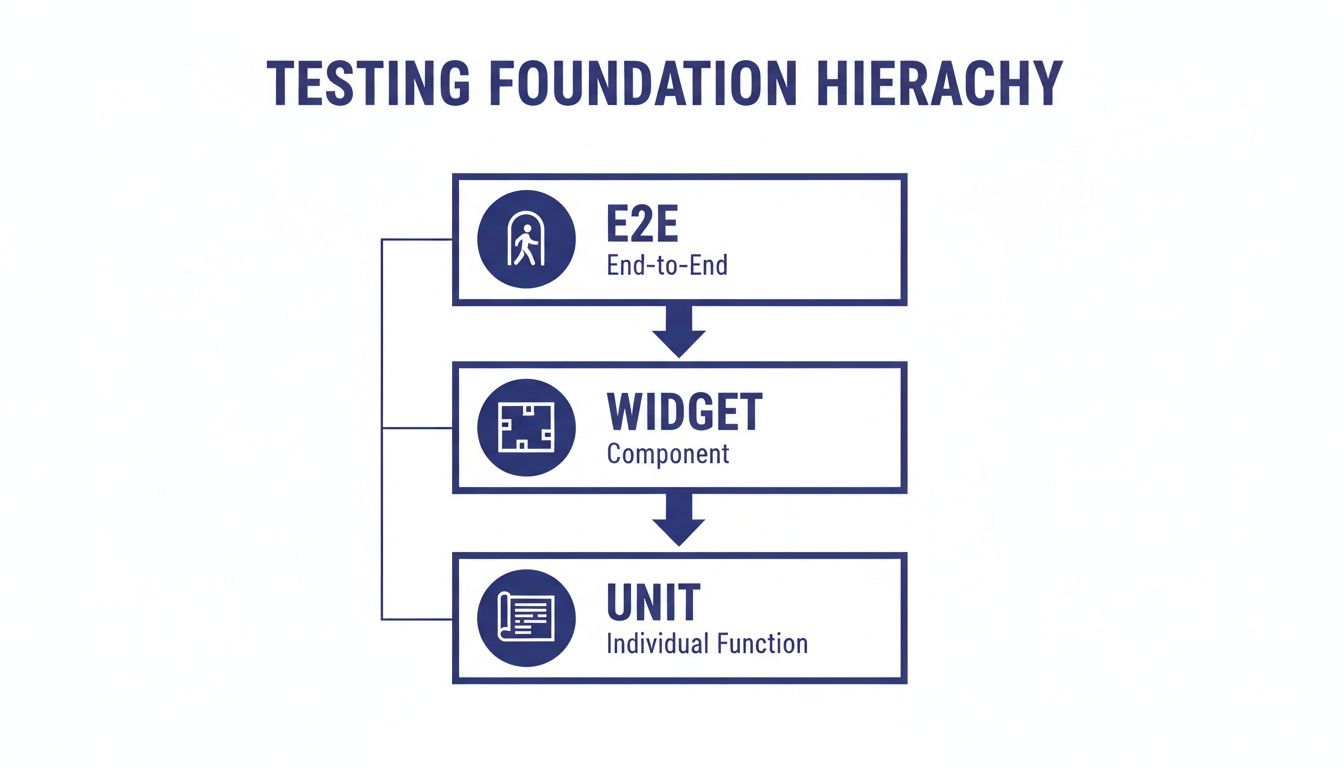
As you can see, the vast majority of your tests should be the quick, isolated ones at the bottom, with more integrated tests becoming rarer as you go up.
From Blueprints to a Final Walkthrough
Let’s bring back our skyscraper analogy to make sense of each layer. Getting your head around these levels is fundamental to building any high-performance Flutter application.
- Unit Tests (The Foundation): This is the wide, solid base of the pyramid. Unit tests are like checking every single brick and steel beam before it’s even put in place. They’re lightning-fast, totally isolated, and cheap to run, verifying that one specific function or method works as expected. Because they’re so quick, you can have hundreds or thousands of them, giving you a rock-solid foundation of quality.
- Widget Tests (The Middle Layer): In the Flutter world, this middle layer is all about Widget Tests. Think of this as inspecting a single, completed floor of your skyscraper. These tests check that a particular UI component—or a group of them on a screen—looks right and behaves correctly when a user interacts with it. They’re faster than testing the whole app but more thorough than a simple unit test, making sure your UI is solid.
- End-to-End Tests (The Peak): Right at the top, we have End-to-End (E2E) Tests. This is the final walkthrough of the entire, finished skyscraper. These tests automate a real user's journey through your complete app, running on an actual device or emulator. They are the slowest and most expensive tests to run, which is exactly why you have so few of them. You reserve them only for your most critical user paths, like logging in or completing a purchase.
To bring it all together, here’s a quick summary of how these layers stack up in the world of Flutter development.
Flutter Testing Pyramid Layers at a Glance
| Testing Layer | Purpose | Execution Speed | Flutter Example |
|---|---|---|---|
| Unit Tests | Verify a single function or class in isolation. | Very Fast | Checking a calculateTotal() method in a cart service. |
| Widget Tests | Test a single UI widget or a screen of widgets. | Fast | Tapping a button and verifying a counter text updates. |
| End-to-End Tests | Simulate a full user journey through the live app. | Slow | Automating a user logging in, adding an item to the cart, and checking out. |
This table neatly shows how each type of test has its own place. By balancing these layers correctly, you create a robust testing strategy that catches bugs early without slowing you down.
Right, so we've covered the theory behind the testing pyramid. But theory only gets you so far. Let's get practical and look at the actual test types you'll be using day-in, day-out as a Flutter developer. These are the core building blocks of any solid quality assurance strategy.
Think of these tests as different tools in your workshop. You wouldn't use a sledgehammer to hang a picture frame, would you? Each test has a specific job, and knowing which one to grab is key to building a high-quality, reliable app. Mastering these basics gives you the confidence that every piece of your app, from the tiniest bit of logic to the entire user journey, works exactly as it should.
Unit Testing: The Building Blocks
First up, at the very foundation, we have Unit Tests. Think of these as the microscopic inspectors of your code. A unit test focuses on a single, isolated piece of logic—a function, a method, or a class—and checks it completely on its own, away from the UI or any outside connections like databases or APIs.
Their job is straightforward: prove that a specific bit of code gives the right output for a given input. Because they're so tightly focused and have no external baggage, they are lightning-fast to run. You can blast through hundreds, even thousands, in a few seconds, getting instant feedback on whether your logic is sound.
For instance, say you've written a function to validate an email address in a sign-up form. A unit test for this would feed it various strings to see what happens:
- A valid email, to make sure it returns
true. - An invalid email (like "test@.com"), to make sure it returns
false. - An empty string, to check it handles that edge case gracefully.
A strong set of unit tests is your safety net. It frees up developers to refactor code or add new features without fear. If they accidentally break something, a failing test will immediately flag it up.
Widget Testing: Your User Interface
Moving up a level, we get to Widget Tests. These are a bit special to Flutter's architecture and are all about checking your UI components. A widget test will check a single widget—or even a whole screen's worth of them—to make sure it looks and behaves correctly in isolation, without having to fire up the whole app.
This is how you confirm your UI is rendering properly, responding to user taps and scrolls, and showing the right data. They are the perfect tool for making sure your app's visual elements are solid and user-friendly. For developers building complex user interfaces, widget tests are an absolute must.
Let's take a simple counter app as an example. A widget test could:
- First, render the screen and check the counter value is '0'.
- Then, it would simulate a user tapping the '+' button.
- Finally, it would re-render the UI and verify the text now shows '1'.
This little sequence confirms the UI not only looks right but actually works when someone interacts with it. To keep these checks organised, it’s really important to structure your test cases well. For a deeper dive, check out our practical guide on what a test case in software testing is and how to write good ones.
Integration Testing: Connecting the Pieces
Last but not least, we have Integration Tests. While unit and widget tests look at components on their own, integration tests are all about making sure different parts of your app work together as a team. They fill the gap between the isolated components and the fully running application.
These tests are vital for checking entire workflows, like a user logging in, fetching data from an API, and seeing it appear on screen. They often need to talk to other services like databases or make real network requests to ensure the whole chain of events is seamless. If you want to get more specific, this guide on the automation of API testing is a great resource.
An integration test for a screen that displays a list of data might look something like this:
- Set up a mock API service that returns a predictable list of items.
- Render the screen that's supposed to show this data.
- Check that the app correctly calls the service, handles the data, and displays the right number of items in the list.
By combining these three core test types, you start to build a really comprehensive testing strategy that covers your app from its internal logic all the way out to the user-facing interface.
Advancing Beyond Functional Bugs
A truly great app does more than just work—it’s also fast, responsive, and secure. Once you’ve built a solid foundation with unit, widget, and integration tests, it’s time to take your quality assurance to the next level. This is where we move beyond simply checking if features work and start ensuring the app excels under real-world pressure.
This next phase is all about diving into the non-functional side of your application, like its performance under heavy load and its defences against security threats. These are the qualities that turn a functional app into an exceptional one, building the kind of trust and loyalty that keeps users coming back.
Putting Performance Under the Microscope
Users today have incredibly high expectations for mobile app performance. A slow, laggy experience is a surefire way to get your app uninstalled in seconds. That’s where Performance Testing comes in—it’s the practice of measuring how your app behaves under specific workloads to make sure it stays fast, responsive, and efficient.
New benchmarks consistently put Flutter at the top for performance, which gives you a fantastic head start. But your own code and architecture play a massive part. The key metrics you need to keep an eye on are:
- Startup Time: How quickly does your app load and become interactive? A few seconds can feel like an eternity to a user.
- Frame Rendering Speed: Does your app maintain a silky-smooth 60 frames per second? Or does it stutter and "jank" during animations and scrolling?
- Battery and Memory Usage: Is your app a resource hog? Draining the user's battery or eating up memory creates a poor overall device experience that they’ll definitely notice.
By actively testing for performance bottlenecks, you're not just fixing technical issues; you're directly improving user retention and satisfaction. A smooth, fast app just feels professional and reliable.
Bolstering Your App Against Threats
In a world where data breaches make headlines all the time, security can't be an afterthought. Security Testing is all about actively trying to find and exploit vulnerabilities in your app to make it tougher against attacks. This is absolutely critical for any app that handles personal information or financial transactions.
Common weak spots include things like insecure data storage on the device, weak encryption when talking to a server, or accidentally leaking data. For any business in a regulated UK sector like finance or healthcare, this isn't just a good idea—it's non-negotiable.
Protecting user data and staying compliant is paramount. In fact, in the UK financial services sector alone, software testing is projected to swallow up 31% of the entire UK software testing market share by 2025. With over 90% of Britons using online banking in 2023, the demand for rock-solid security testing, including specialised frameworks like CBEST, is huge. You can get a deeper look at these market insights for software testing in financial services.
By dedicating real effort to both performance and security, you move beyond the basics of squashing functional bugs and start building an app that is truly high-calibre.
Integrating Testing into Your Flutter Workflow
Knowing the theory behind different test types is one thing, but actually putting it into practice is where you build a truly resilient, high-quality app. The goal is to stop treating testing as an afterthought and start seeing it as a seamless, automated, and non-negotiable part of your development process. It's all about embedding a strong testing culture right into your workflow.
For Flutter developers, the good news is that the ecosystem gives you powerful, built-in tools to make this happen. The core flutter_test package is your go-to for writing fast and reliable unit and widget tests. Then, when you need to be absolutely sure a whole user journey works from start to finish, the integration_test package lets you automate end-to-end tests that run on a real device or emulator. That’s how you get real confidence.
From Manual Checks to Automated Pipelines
The real game-changer here is automation. Let's be honest, manually running tests is a grind. It's slow, tedious, and leaves the door wide open for human error. By integrating your tests into a Continuous Integration/Continuous Deployment (CI/CD) pipeline, you create a safety net that automatically validates your code every single time a change is made.
This process guarantees that no new feature or bug fix can be merged if it breaks something else. Every commit triggers the automated test suite, giving the development team immediate feedback. This catches regressions the moment they happen, keeps the codebase stable, and seriously speeds up your release cycle. If you want to dig deeper into this, we've got a detailed explanation of what continuous integration is for Flutter apps.
The command-line interface is the key. It's how you hook your tests into any CI/CD platform, whether it's GitHub Actions, Codemagic, or something else, turning your test suite into an automated quality gatekeeper that never sleeps.
An Actionable Checklist for Your Team
To really nail this, your team needs to be on the same page. Adopting a few best practices can transform your approach from reactive bug-fixing to proactive quality assurance. It's a mindset shift.
The most effective testing cultures treat tests as first-class citizens, just as important as the feature code they are verifying. This mindset shift is crucial for long-term project health and scalability.
Here’s a practical checklist to help your team make testing a core part of how you build software:
- Write Tests Alongside Features: Don't leave testing until the end of the sprint. Write your unit and widget tests as you build new functionality. This bakes quality in from the very beginning.
- Aim for Meaningful Coverage: Forget about chasing an arbitrary number like 100% coverage. Instead, focus on thoroughly testing your most critical user flows, complex business logic, and any areas you know are prone to bugs. Quality over quantity, always.
- Establish a Review Process for Failures: A failing test in the CI pipeline should be a big deal—an "all hands on deck" moment. Create a clear process for analysing, assigning, and fixing the failure before any more code gets merged.
- Regularly Maintain Your Test Suite: Your tests are code, too, and they need looking after. As your app evolves, you'll need to refactor and update your tests to keep them relevant, fast, and reliable.
Common Questions on Flutter Testing
Even with the best roadmap, a few questions always pop up when the theory of testing meets the reality of a project. Let's tackle some of the most common queries we hear from developers and product owners to clear things up and build on what we've already covered.
How Much Test Coverage Is Enough for a Flutter App?
There isn't a single magic number that fits every project, but aiming for 70-80% test coverage on your core business logic is a solid benchmark. The real aim, though, should always be quality over sheer quantity. It's much better to have bulletproof tests covering your critical user journeys and tricky logic than it is to chase a 100% score by testing simple, boilerplate code.
This becomes especially important for UK businesses in sectors like finance or e-commerce where sensitive data is involved. You absolutely must ensure every payment gateway and data-handling process is rigorously tested. For both regulatory compliance and user trust, it's completely non-negotiable.
What Is the Difference Between Widget Testing and E2E Testing?
This question really gets to the core of what makes Flutter's testing suite so powerful. The best way to think about it is with an analogy.
- Widget testing in Flutter is like checking a single Lego brick. You can inspect its colour, its shape, and how it snaps to other pieces without having to build the entire Millennium Falcon. It’s incredibly fast, making it perfect for confirming your UI components look and behave exactly as you designed them.
- End-to-End (E2E) testing, on the other hand, is like building the entire Lego model and making sure it all holds together. Using a package like
integration_test, it runs your complete app on a real device or an emulator, walking through a user's journey from start to finish.
While widget tests are quick and focused, E2E tests provide the ultimate confidence. They take longer to run, but they are essential for proving that all the individual pieces of your app work together perfectly in a real-world scenario.
Can I Start Testing an Existing App That Has No Tests?
Yes, absolutely. It's never too late to start improving your app's quality and stability. The key is to avoid feeling overwhelmed by trying to do everything at once. The best approach is to start small and be strategic.
A great place to start is by writing tests for any new features you add or any bugs you fix. This simple habit immediately stops technical debt from piling up and begins building that crucial safety net.
At the same time, take a look at your existing app and identify the most critical or high-risk areas. This usually means core user journeys like logging in, processing payments, or handling important data synchronisation. By focusing your initial efforts here, you deliver immediate value by making your app's most important functions more robust. A gradual, targeted strategy like this is far more manageable and sustainable than a massive overhaul.
At App Developer UK, we build these testing principles into every project from day one. It's how we deliver high-performance Flutter applications that are reliable, secure, and ready for the market. To find out how our expert UK-based team can bring your vision to life, visit us at https://app-developer.uk.