A Guide to Quality Assurance for Software Development
A Guide to Quality Assurance for Software Development
Software quality assurance isn’t just some box-ticking exercise you do right before launch. Think of it as the ongoing strategic process that makes sure your app is reliable, secure, and works exactly as it should, every single time. For any business pouring money into a mobile app, solid quality assurance for software is what separates a chart-topper from a costly failure. It’s what protects your investment and your reputation.
Why Quality Assurance Is Your App's Master Blueprint

Imagine you’re building a skyscraper. You wouldn’t wait until the ribbon-cutting ceremony to check for cracked windows or faulty wiring, would you? Of course not. You’d test the foundations, make sure the steel frame is sound, and check every system at each stage of construction.
Quality assurance for software works the same way. It’s a proactive discipline, not a reactive chore.
This process goes way beyond just "bug hunting." It’s about methodically preventing defects from ever getting into the hands of your users in the first place. In a competitive market like the UK, this isn't just some technical footnote—it's a critical part of doing business.
A Foundation for Success in the UK Market
The sheer scale of the software economy makes a structured approach to QA non-negotiable. With the UK's software development industry expected to hit £49.3 billion in revenue in 2025-26, the price of getting it wrong is massive.
As more and more business operations rely on mobile apps, a single glitch can have enormous consequences. This is why QA can account for a hefty slice of a project's budget; catching a problem early is always, always cheaper than fixing a disaster after you've gone live.
"Quality Assurance is the art of building confidence that a product will perform as expected. It instils trust not only in the end-users but also in the development team and stakeholders, creating a virtuous cycle of excellence."
From Theory to Practical Application
So, what does this mean for your project? A quality-first mindset touches every single phase of development. It ensures that from the initial idea to the final release, your app is built on a solid foundation of reliability and performance.
This is particularly true for high-performance frameworks like Flutter, where new benchmarks confirm its top-tier speed and responsiveness. A strong QA strategy makes sure that potential is fully realised.
To get a handle on the entire process from start to finish, it's worth checking out a practical guide to quality assurance in software development. This structured approach is ultimately what protects your investment and turns a good idea into a great user experience.
What's the Real Price of Cutting Corners on QA?
Let's move past the theory. What does skimping on quality assurance for software actually look like for a business here in the UK? It’s not about a few minor annoyances. It’s a domino effect of failures that can stop a company’s growth in its tracks, usually when it can least afford it.
Picture a promising UK startup. They've poured their heart, soul, and budget into a slick new Flutter app. The launch date is set, the marketing campaign is ready to go, but they’re running behind. To meet the deadline, they decide to cut corners on testing. "We'll just patch any small bugs later," they figure.
The campaign kicks off, and new users start flooding in. Then it happens. A single, undiscovered bug in the database connection logic triggers a catastrophic failure. The app crashes, payments fail, and user data becomes inaccessible. The dream launch has just become a real-life nightmare.
The Immediate Financial Fallout
The first hit is purely financial, and it’s a big one. The startup is now shelling out emergency rates for developers to work around the clock—not building exciting new features, but desperately trying to control the damage. Every single hour the app is down means lost sales and subscription fees.
At the same time, the customer support team is drowning in a sea of tickets and angry phone calls, adding huge operational costs. That one little bug has already torched a massive chunk of their post-launch budget in just a couple of days.
A quality-first approach isn't an optional extra; it's essential insurance for your development budget, brand reputation, and future growth. A single bug can easily cost 100 times more to fix after launch than it would have during the development phase.
The Long-Term Damage to Your Credibility
While the financial sting is painful, the damage to their reputation is far, far worse. The app store reviews tank, plummeting to one star. Social media lights up with complaints from frustrated users who feel completely let down. The brand, once seen as the next big thing, is now synonymous with failure.
This isn’t just a PR headache; it translates directly into lost customers. A staggering 88% of users will ditch an app after a bad experience, and most of them will never come back. The startup didn't just lose out on initial sales; they lost the entire lifetime value of thousands of potential customers.
The Wider UK Context of Software Failures
This story isn’t some rare, cautionary tale. Across the UK, weak quality assurance is a serious risk that costs organisations hundreds of thousands of pounds every year. Tricentis' 2025 Quality Transformation Report revealed that 60% of UK manufacturers expect at least one major software outage in the next year. Over half of them estimate that poor software quality costs them between £390,000 and £773,000 annually, with nearly a third reporting losses even higher than that. Unsurprisingly, almost 72% admit to releasing untested code when they’re under pressure. You can find out more about these costly software failures and the challenges UK businesses face.
When it comes down to it, neglecting QA isn’t a shortcut; it’s a gamble with terrible odds. The true cost isn’t measured in bug reports, but in lost revenue, a shattered reputation, and opportunities that have vanished for good. A proactive, quality-first approach is the only sensible way to build a successful app that people will trust and love to use.
The Core Pillars of Mobile App Quality Assurance
To build a flawless Flutter app, your approach to quality assurance for software can't just be a vague idea of "checking for bugs". You need a proper strategy, one built on several distinct, yet interconnected, types of testing.
Think of it like a chef preparing a gourmet meal. Every single stage, from choosing ingredients to the final presentation, is vital for the dish to be a success. Let's break down these core pillars. Each one looks at a different part of your app, making sure everything performs perfectly, from the smallest component to the overall user experience.
Unit Testing: The Foundational Ingredients
Unit testing is where it all begins. It's the most fundamental layer of quality assurance, where we test the smallest, most isolated pieces of your app's code—the individual "units"—to make sure they work exactly as expected.
In our chef analogy, this is like meticulously checking every single ingredient before you even think about cooking. Is the flour fresh? Are the vegetables crisp? Is the seasoning just right?
In a Flutter app, a "unit" might be a single widget, a specific function, or a method inside a class. For example, a developer might write a unit test just for the 'Add to Cart' button widget to confirm it triggers the right action when someone taps it. These tests are written by developers and are designed to be incredibly fast, building a strong foundation and making it much easier to spot and fix issues later on.
Overlooking this foundational step can have a dangerous domino effect, as this flowchart shows.
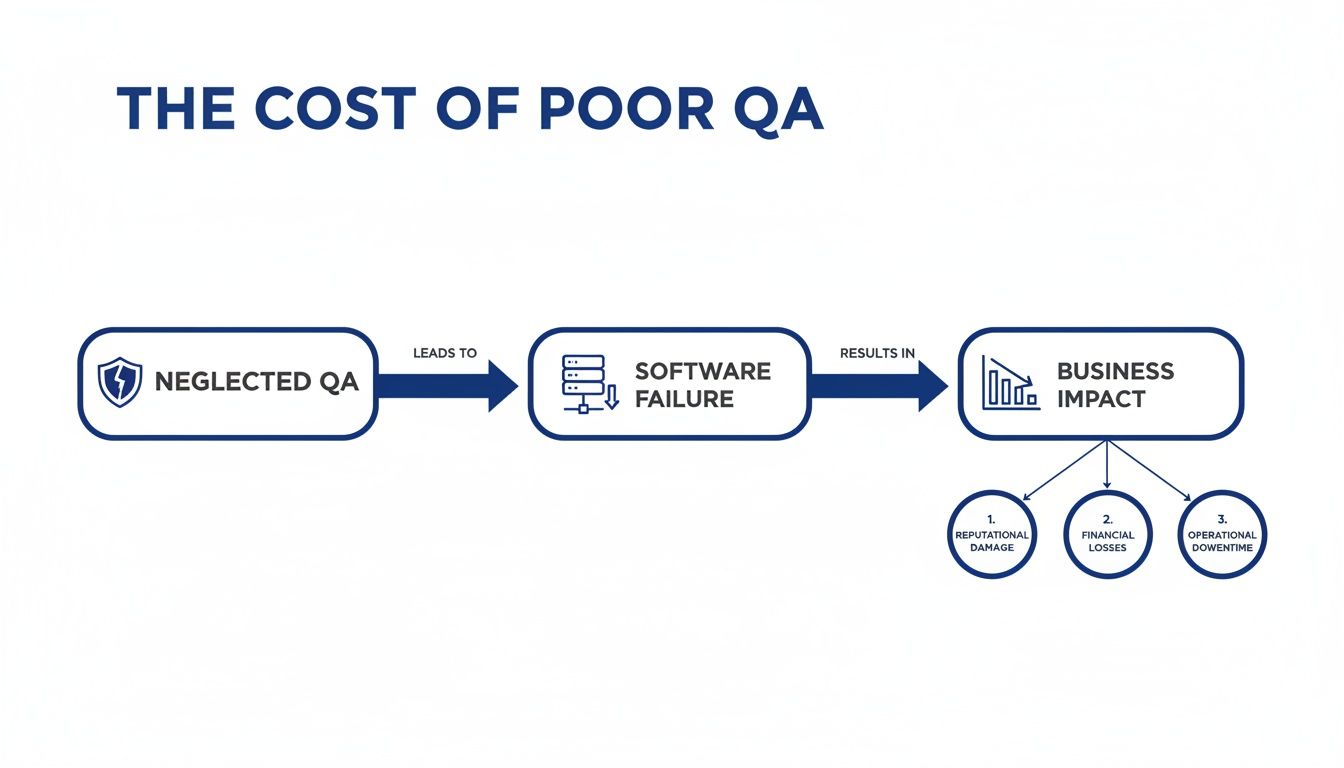
As you can see, skipping the basics of QA can lead straight to software failures, which in turn create massive problems for the business.
Integration Testing: Combining the Recipe
Once you're confident that your individual ingredients are perfect, it’s time to see how they work together. This is integration testing. Its whole purpose is to verify that different modules, services, and components of your app can communicate and function correctly as a group.
Back to our kitchen, this is where the chef starts combining ingredients to create a sauce or a filling. Does the lemon juice curdle the cream? Does the spice mix completely overpower the main flavour? You have to check.
A classic example in a Flutter app is testing the entire checkout process. This isn't about one button working; it’s about the whole chain of events. The test would verify that the shopping cart module talks to the payment gateway, which then connects to the user's bank to get the transaction authorised. Streamlining these complex checks is crucial, and you can learn more about this by exploring what automated testing is and how it can boost your software quality.
UI and UX Testing: The Final Taste Test
With all the components combined and working together, it's time to bring in the most important critic of all: the user. User Interface (UI) and User Experience (UX) testing is all about ensuring the app isn't just functional, but also intuitive, visually appealing, and genuinely easy to use.
This is the final taste test and presentation check before the dish leaves the kitchen. Does it look appetising? Is it easy to eat? Will it delight the diner?
For a mobile app, this involves checking things like:
- Visual Consistency: Do all the screens follow the same design language?
- Navigational Flow: Can users find what they're looking for without getting lost?
- Responsiveness: Does the app look and work properly on different screen sizes and devices?
Quality assurance isn't just about preventing crashes; it's about crafting an experience that feels seamless and intuitive, turning first-time users into loyal customers.
Performance and Security: The Kitchen Under Pressure
Finally, we have two critical pillars that ensure your app can handle real-world demands and threats.
Performance testing is about making sure your app can handle the pressure. Can the kitchen manage hundreds of orders during the dinner rush without grinding to a halt? This type of testing measures your app's speed, responsiveness, and stability under heavy load, looking for problems like slow loading times, battery drain, and crashes. As a UK Flutter developer, we know performance is everything; benchmarks consistently show Flutter leading the pack, and rigorous testing is how we deliver on that promise.
Security testing, on the other hand, is like locking up the pantry and securing the kitchen doors. It's a proactive hunt for vulnerabilities that could be exploited by malicious actors, protecting sensitive user data and maintaining the trust you've worked so hard to build.
To bring this all together, here’s a quick summary of the key testing types you’ll encounter when building a robust Flutter application.
Key Testing Types for Flutter App Development
| Testing Type | Primary Goal | Example in a Flutter App |
|---|---|---|
| Unit Testing | Verify that individual, isolated code components work correctly. | Testing a function that formats a date string to ensure it returns the expected output. |
| Integration Testing | Ensure different modules or services communicate and work together as a group. | Verifying that the login screen successfully authenticates a user against a database. |
| UI Testing | Confirm that the user interface looks and behaves as designed across devices. | An automated script that taps a button and checks if the correct new screen appears. |
| Performance Testing | Measure the app's speed, responsiveness, and stability under load. | Simulating 1,000 users logging in simultaneously to check for slowdowns or crashes. |
| Security Testing | Identify and fix vulnerabilities to protect user data. | Checking for weaknesses in how the app stores sensitive information on the device. |
Each of these testing methods plays a unique and vital role. By combining them, you create a comprehensive QA strategy that covers your app from the inside out, ensuring a high-quality, reliable, and secure final product for your users.
Integrating QA into Your Flutter Development Lifecycle

Traditionally, quality assurance for software was seen as the final hurdle before launch. Developers would code an entire application, toss it over the wall to a QA team, and hope for the best. This old-school process is slow, clunky, and can lead to eye-watering costs when huge problems pop up just before a release.
There’s a much smarter way to work: the 'Shift-Left' philosophy. This isn't just another industry buzzword; it's a completely different way of thinking that weaves quality checks into every single stage of development, right from the very beginning.
Think of it like directing a film. The old method is like waiting until the entire movie is shot and edited before you watch a single frame. If you finally see a microphone dipping into the shot or some wooden acting, you’re looking at expensive and time-consuming reshoots. Shifting left is like reviewing the daily rushes. You spot mistakes as they happen, give instant feedback, and fix them on the spot. The result? A much better final cut.
This proactive mindset is a perfect match for a high-performance framework like Flutter. By testing early and often, we squash bugs when they’re small, simple, and cheap to fix. It makes the whole development journey smoother and far more predictable.
The Power of Continuous Testing in a Flutter Project
Putting the Shift-Left idea into practice means embracing continuous testing, which is the engine of a modern CI/CD pipeline. This stands for Continuous Integration and Continuous Delivery, and it’s all about automating how you build, test, and deploy your app.
Picture your CI/CD pipeline as an automated quality control line in a factory. Every time a developer commits a piece of code—even a one-line change—the assembly line kicks into action. It automatically builds the app and runs a whole suite of tests (unit, widget, and integration) to make sure the new code hasn't broken anything.
This gives developers immediate feedback. If a test fails, they know instantly and can fix the bug while the code is still fresh in their mind. This rapid feedback loop is what drives high-quality development, stopping tiny errors from snowballing into massive, system-wide headaches.
By automating testing within a CI/CD pipeline, development teams can increase their release frequency by over 90% and drastically cut down on failures in production. Quality assurance stops being a bottleneck and becomes an accelerator.
Leveraging Flutter’s Built-In Testing Framework
One of Flutter’s biggest strengths is its incredibly powerful and well-thought-out testing framework. Google built it from the ground up to support this continuous testing workflow, giving developers everything they need to bake quality in at every level. If you want to get into the nitty-gritty, you can check out a developer's guide to the basics of testing in Flutter.
This integrated framework makes it straightforward to write different kinds of tests:
- Unit Tests: Perfect for checking a single function, method, or class in isolation.
- Widget Tests: For making sure an individual UI widget looks and behaves exactly as you expect.
- Integration Tests: These test a complete feature or a user journey across multiple parts of the app.
Tools built for the Flutter ecosystem, like Codemagic, plug directly into this framework. You can set them up to automatically run your entire test suite in the cloud every time code is pushed. This creates a quality gate, ensuring no new feature or fix gets merged until it passes every check.
By combining the Shift-Left philosophy, a solid CI/CD pipeline, and Flutter’s fantastic testing tools, you create a powerful system for ensuring quality. This modern approach leads to faster development, better code, fewer nasty surprises, and ultimately, a much more successful app for your business.
Building Your Software Quality Assurance Team
Effective quality assurance for software isn't a solo performance. It's more like a symphony, where different skills and perspectives come together to create something robust and reliable. A solid team structure is what separates basic bug hunting from building a genuine culture of quality.
This all starts with understanding who does what. Developers are your first line of defence, writing unit tests to make sure their own code works as expected. QA Engineers then zoom out, looking at the bigger picture by designing and automating tests for complex user journeys. And steering the ship are the Product Managers, who define what ‘success’ actually looks like by setting clear acceptance criteria for every new feature. When these roles click, bugs are caught early, and the end product is infinitely better for it.
Resourcing Your QA for the UK Market
For any business in the UK, the next question is obvious: how do you actually staff this critical function? Do you build a team from the ground up, or bring in a specialist agency? Both paths have their own set of pros and cons, and the right choice really hinges on your company's size, in-house expertise, and where you're heading long-term.
- Hiring In-House: An internal team lives and breathes your product. They build up deep knowledge and are perfectly aligned with your company culture. The trade-off? It’s a serious investment in recruitment, training, and tools. To get a better sense of what's involved, check out our ultimate guide to hiring a quality assurance engineer.
- Partnering with a Specialist: Going with an external partner gives you instant access to seasoned pros and sophisticated automation tools, all without the overhead. This model frees up your core team to focus on building new things, while the QA specialists handle the rigorous testing.
Often, the sweet spot is a blend of both. You might have an internal product owner setting the quality bar while a specialist partner handles the heavy lifting of complex testing. It’s a powerful and efficient combination.
Navigating the UK Skills Gap
For many UK companies, the choice between hiring and partnering is becoming less of a choice and more of a necessity. Quality assurance is big business; IBISWorld estimates that the Software Testing Services industry in the UK will hit around £1.3 billion in revenue by 2025.
But here's the catch: despite that growth, there's a major skills gap. In 2024, the UK had only 25 software testers for every 100,000 people, while the demand for skilled testers is jumping by roughly 25% every year. This talent shortage is naturally pushing more and more businesses towards specialist QA providers who already have the experts on hand.
For a UK business trying to launch a high-performance Flutter app, partnering with a specialist development agency is often the smartest, most efficient path. It lets you sidestep the hiring headaches and guarantees your app is built to the highest quality standards from day one. As a UK-based Flutter developer, we know first-hand that this expert-led approach to quality is what separates the good apps from the great ones.
A Practical QA Checklist for Your Next App Project
Let’s be honest, diving into the world of quality assurance for software can feel like a minefield if you’re not a technical expert. This simple checklist is designed to cut through the jargon and empower you—the business owner or project manager—to have real, meaningful conversations with your development partner.
It isn’t about code; it’s about getting clarity, establishing accountability, and making sure quality is a shared goal from day one. Think of these as your go-to questions for each project phase, keeping everyone aligned and giving you confidence that your investment is protected.
Pre-Development and Planning Phase
Before your team even thinks about writing a single line of code, you need a solid quality plan. This is where you lay the groundwork, set the standard for success, and agree on what "done" actually looks like.
- How are we defining and documenting the acceptance criteria for each feature? Vague goals lead to disappointing results. Make sure every feature has a crystal-clear, measurable definition of success before any work begins.
- What's our game plan for security and data privacy from the outset? Security can't be a box you tick at the end. You need to discuss how user data will be handled and how the app will be shielded from common threats right from the start.
- Who has the final say on signing off features, and what does that process look like? Get the roles straight from the beginning. Knowing who gives the final thumbs-up stops delays in their tracks and keeps everyone accountable.
During the Development Cycle
As your app starts taking shape, quality checks need to become part of the daily rhythm. This is where you bake testing into the workflow, preventing tiny hiccups from snowballing into massive pre-launch headaches.
By asking the right questions during development, you transform quality assurance from a final inspection into an ongoing, collaborative process. This proactive approach is the single most effective way to prevent costly surprises down the line.
- What percentage of the code is covered by automated unit tests? High test coverage is a massive indicator of quality and stability. It means the core building blocks of your app are being rigorously checked as they're built. For a deeper dive into crafting great tests, check out these Top Quality Assurance Tips for Test Case Planning Processes.
- How are we tracking and prioritising bugs and technical issues? You need a transparent system, whether it’s Jira, Trello, or something similar. This ensures every issue is captured, sized up, and squashed in an organised way, not just forgotten in an email chain.
Pre-Launch and Final Checks
The finish line is in sight, but don't let up now. This final phase is absolutely critical for making sure your launch day is a celebration, not a catastrophe.
- How will we benchmark the app's performance on different devices and network conditions? Your app needs to feel snappy and responsive for everyone, not just on the developer's top-of-the-line phone with super-fast Wi-Fi. That means testing on older models and dodgy 3G connections, too.
- What's the plan for User Acceptance Testing (UAT)? Before you go live, you need real people—your target audience—to get their hands on the app. UAT confirms that it not only works but also meets their needs and expectations in the real world.
- Do we have a rollback plan in case of a critical issue post-launch? Always hope for the best but plan for the worst. Having a clear, well-rehearsed plan to quickly revert to a previous stable version is essential insurance if something goes seriously wrong.
Got Questions About Software QA?
When it comes to quality assurance for software, we find a few key questions pop up time and time again. Let's tackle them head-on, giving you the straightforward answers you need to understand how a solid QA process really works.
How Much of Our Budget Should Go to Quality Assurance?
A general rule of thumb you’ll often hear is to set aside 25-40% of your total development budget for QA. But honestly, it's better to think of it not as a cost, but as an investment in preventing much bigger costs down the line.
Catching a bug early is cheap and simple. Fixing that same bug after launch, when it’s causing user frustration, brand damage, and emergency patches? That’s where the real expense lies. A good development partner won't just slap QA on at the end; they’ll weave it into the project plan from day one, building quality in, not bolting it on.
Won't a Proper QA Process Slow Down Our Launch?
This is probably the biggest myth in app development. The idea that thorough QA holds things up is completely backwards. In reality, an integrated QA process actually helps you get a stable, polished app to market faster.
By finding and squashing bugs as they appear, you avoid those nasty, last-minute surprises that can completely derail a launch schedule. An approach where you ‘test-as-you-go’, especially with automation humming away in the background, creates a much smoother and more predictable journey to launch day.
What’s the Real Difference Between QA and Testing?
It’s easy to get these two mixed up, but the difference is fundamental. Think of it like this: Testing is about finding the problems, while Quality Assurance (QA) is the grand strategy for preventing them in the first place.
Testing is a specific action—like checking if the login button works. QA is the entire proactive system. It’s about setting quality standards, defining the right processes, and building a culture that makes sure the product is built correctly from the get-go.
Simply put, testing is reactive, but QA is proactive.
Can't We Just Get Our Own Team to Do the Testing?
Your internal team is absolutely brilliant for User Acceptance Testing (UAT)—that final check to make sure the app does what your business needs it to do. But when it comes to the deep, technical stuff? That requires a specialist.
Professional QA engineers bring a whole different set of tools and skills to the table. They’re running complex performance, security, and automation tests that go way beyond what you can spot with a manual check. If you’re aiming for a world-class Flutter app that really performs, you need a team with dedicated QA experts to make sure every corner of your app is solid, secure, and reliable.
Ready to build a high-performance Flutter app with quality at its core? The team at App Developer UK specialises in creating robust, reliable, and stunning applications for UK businesses. Contact us today to discuss your project.