The Basics of Software Testing: Your Guide to Building Quality Apps
The Basics of Software Testing: Your Guide to Building Quality Apps
Picture this: you've just launched your shiny new app. Excitement is high. Then, the bug reports start rolling in. Crashes. Glitches. Your first hundred users are having a terrible time. Software testing is the process that stops this nightmare from becoming your reality. It's about methodically checking, prodding, and pushing your application to find and fix problems before your customers ever see them.
Why Software Testing Is Your Most Important Step
Don't think of testing as just a final checkbox to tick off before launch. It's the very foundation of user trust and your business's credibility. Every developer, no matter how skilled, is human. Mistakes happen. Without a solid testing process, those tiny errors can snowball into massive issues, from embarrassing on-screen goofs to critical security flaws. Testing is the quality control that turns a collection of code into a reliable, trustworthy product.
Taking a proactive approach here is non-negotiable, and for good reason:
- Protecting Your Brand: A buggy app is a fast track to a bad reputation. First impressions are everything, and a smooth, flawless experience is what builds the kind of trust that keeps users coming back.
- Saving Time and Money: Finding and fixing a bug early on is massively cheaper than dealing with it after launch. A post-launch fix isn't just a developer's time; it's customer support calls, patch rollouts, and potentially lost sales.
- Ensuring Security: In a world full of data breach headlines, rigorous security testing is an absolute must. It’s what stands between your users' private information and a costly, reputation-shattering disaster.
The Growing Importance in the UK Market
Over here in the UK, businesses truly get the value of professional testing. It's not just some line item in a project plan; it's a major industry. In fact, recent analysis shows the UK software testing services market has ballooned to an estimated £1.3 billion in revenue. That figure alone shows you how seriously British companies are taking quality assurance.
Ultimately, getting to grips with software testing is about more than just squashing bugs. It's about building a robust development process from the ground up. To really nail this, you should delve into the top software testing best practices. This will help you deliver a product that doesn't just work, but one that genuinely impresses your users and smashes its business goals.
Understanding the Four Levels of Software Testing
Thinking about software testing as one giant task is a common mistake. It’s actually a structured process with distinct layers, a bit like building a high-performance car. You don’t just throw all the parts together and hope for the best. Instead, you check each component, then see how they work together, and finally, take the whole thing for a test drive.
This layered approach is crucial. Each level of testing builds on the last, verifying the quality of your software from the smallest bit of code right up to the entire system. Catching issues early in this process makes them far easier and cheaper to fix down the line.
The hierarchy generally follows four fundamental levels, starting with the most focused tests and ending with the final user sign-off.
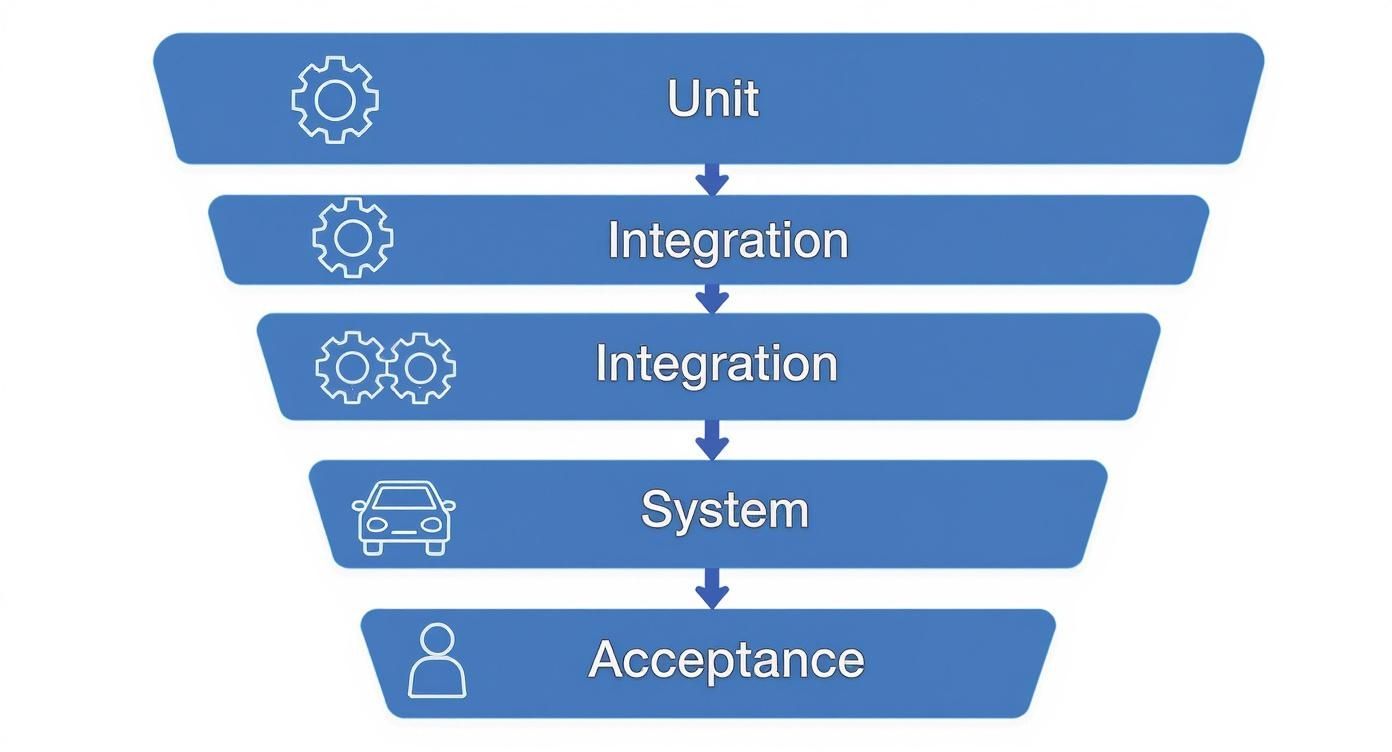
This structure ensures your foundation is solid before you start checking how all the pieces interact, which saves a world of headaches later on.
Level 1: Unit Testing
First up, we have Unit Testing. This is the most granular level of testing, where you're down in the trenches with the code. Think of it as inspecting every single nut, bolt, and wire before you even think about assembling the car.
The whole point here is to isolate and test the smallest, individual pieces of your code—we call these 'units'. The goal is simple: prove that each tiny function or component does exactly what it’s supposed to do, all on its own. For a Flutter app, a unit test might check if a function correctly calculates the total in a shopping cart or if a data model handles a specific input just right.
Level 2: Integration Testing
Once you know the individual parts are working as they should, it’s time to see how they play together. This is where Integration Testing comes in. Sticking with our car analogy, this is when you connect the engine to the transmission and make sure they work in perfect harmony.
In the software world, integration tests focus on the interactions between different units or modules. For example, does the app correctly fetch a user’s profile data (one unit) right after they log in (another unit)? These tests are absolutely vital for finding glitches in the communication and interfaces between your app's different components.
Level 3: System Testing
With all the parts now integrated, it’s finally time for a proper test drive. System Testing is the first time you test the entire, completed application as a whole. It’s like taking the fully assembled car to a private track to check everything—steering, brakes, acceleration, the works—in a controlled environment.
This level validates that the complete system meets all the requirements you set out at the start. Testers run through end-to-end scenarios, checking functionality, performance, and security across the entire application, simulating how a real user would interact with it from start to finish.
Level 4: User Acceptance Testing
The final checkpoint is User Acceptance Testing (UAT). After the car has passed all your internal quality checks, you hand the keys to the customer. They’re the ones who will take it out on real roads, in real traffic, to decide if it truly meets their needs and expectations.
UAT is typically carried out by the actual end-users or the client to confirm the software is ready for the real world. It’s the ultimate reality check. This last step ensures the app not only works correctly from a technical standpoint but also delivers genuine value and solves the problem it was built for.
To make this a bit clearer, here’s a quick summary of how these four levels stack up against each other.
The Four Levels of Software Testing at a Glance
| Testing Level | Primary Goal | Analogy | Typically Performed By |
|---|---|---|---|
| Unit Testing | Verify individual code components work in isolation. | Inspecting each nut and bolt before assembly. | Developers |
| Integration Testing | Ensure different modules or services work together correctly. | Connecting the engine to the transmission. | Developers & Testers |
| System Testing | Validate the complete and integrated software as a whole. | Taking the fully assembled car for a test drive on a track. | QA Testers |
| User Acceptance Testing | Confirm the software meets business needs and is ready for release. | Letting the customer drive the car on real roads. | End-Users/Clients |
Each level has a distinct purpose, and skipping one can lead to bigger, more expensive problems popping up just when you least want them—after you’ve gone live.
Diving into the Core Types of Software Testing
So, you’ve got the levels of testing sorted—the different stages like unit, integration, and system. The next logical question is: what are we actually testing for? This is where we shift from the ‘where’ to the ‘what’ of quality assurance and explore the different types of software testing.
Think of it this way: testing types fall into two big buckets, each answering a critical question about your app. One asks if a feature does what it’s supposed to, and the other asks how well it performs in the real world. A solid testing strategy needs both.
Functional Testing: Does the Feature Actually Work?
Functional testing is all about verification. It’s the nitty-gritty work of making sure every feature in your app behaves exactly as the requirements document says it should. The question at its heart is simple: “Does this do what it’s supposed to do?”
Here, you’re not digging into the code itself. Instead, you're focused entirely on inputs and outputs, just like a real user would be. Does tapping this button add the item to the cart? Does filling out this form and hitting ‘Submit’ create a new account?
Key types of functional testing include:
- Unit Testing: We met this one when talking about levels, but it's also a fundamental type of functional test. It checks that the smallest, most isolated pieces of code—the ‘units’—work correctly on their own.
- Integration Testing: This is where you check if different modules or services play nicely together. Can the user authentication module successfully talk to the user profile service? Integration tests find out.
- System Testing: This looks at the complete, fully assembled application to make sure it meets all the specified requirements from start to finish.
- Regression Testing: This might just be the most important one on the list. Every time you roll out a new feature or squash a bug, regression testing ensures your changes haven't accidentally broken something that used to work perfectly. Without it, development can feel like taking two steps forward and one massive step back.
Non-Functional Testing: How Well Does It Work?
If functional testing confirms what an app does, non-functional testing evaluates how it does it. This is all about the user experience—judging the app’s performance, reliability, and ease of use under pressure. After all, a feature that works but is painfully slow is just as broken as one that doesn’t work at all.
Some of the most important non-functional tests are:
- Performance Testing: Picture your e-commerce app on Black Friday. Performance testing is how you find out if it can handle that surge. It measures speed, responsiveness, and stability under heavy load.
- Security Testing: Think of this as hiring a professional to check all the locks and windows on your brand-new house. Security testing proactively hunts for vulnerabilities and weaknesses that could be exploited, protecting your users and your business from costly data breaches.
- Usability Testing: How obvious is your app to someone using it for the very first time? Usability testing gets real users to interact with your software while you observe, helping you spot confusing layouts or frustrating workflows.
This wide range of tests is crucial, especially in high-stakes industries. Take the financial services sector in the UK, which has become a huge driver of software testing spending. The UK’s financial services (FS) sector accounted for 31% of total software testing spend in the country during the last reporting period, a number driven by the non-negotiable need for flawless security and performance. You can get more insights from the KPMG report on software testing in financial services.
A successful application isn't just one that's free of bugs; it's one that is also fast, secure, and intuitive. Neglecting non-functional testing is like building a car with a powerful engine but no brakes or steering—it might go, but the journey will be a disaster.
Of course, each of these test types relies on carefully crafted scenarios to be effective. For a deeper dive into how to structure these, check out our guide on what a test case is in software testing.
Choosing Your Approach: Manual vs Automated Testing
When you’re getting to grips with software testing, one of the first big questions you'll hit is whether to test by hand or let a machine do the work. This isn't about one being flat-out better than the other. Think of manual and automated testing as two different tools in your workshop, each designed for a specific job. The real skill is knowing which one to pick for the task at hand.
Manual testing is all about the human touch. It’s like a head chef tasting a new sauce, checking for that perfect balance of flavour, texture, and aroma—subtle things that demand real-world experience and intuition. This approach is brilliant for tasks that need creativity, empathy, and an understanding of how a user feels.
Automated testing, on the other hand, is your precision production line. It excels at performing the same repetitive task thousands of times over with incredible speed and accuracy. It never gets tired, it never gets bored, and it never makes a slip-up. It's the perfect choice for checks that have to be fast, consistent, and flawless every single time.
When to Rely on Manual Testing
Manual testing really comes into its own where human intelligence is irreplaceable. It’s the best option for exploratory testing, where a tester navigates the app freely, almost like a real user, to uncover unexpected bugs and weird quirks. It's also absolutely essential for usability testing, because only a person can tell you if an app feels intuitive or just plain confusing.
You'll want to opt for manual testing when you are:
- Exploring Brand-New Features: When a feature is fresh out of development and the requirements are still shifting, manual exploration is far more flexible than writing automation scripts you'll just have to rewrite tomorrow.
- Checking the User Experience (UX): Things like the look and feel, the logic of the workflow, and the overall user-friendliness of an application demand human judgement.
- Performing Ad-Hoc and Exploratory Tests: These tests have no script. They rely entirely on the tester's creativity and experience to find those weird edge cases that a pre-written script would almost certainly miss.
When to Implement Automated Testing
Automated testing delivers its biggest wins when dealing with stable, repetitive, and time-sucking tasks. By handing these over to a machine, you free up your human testers to focus on more complex, creative work that actually adds more value. Yes, the initial setup takes a bit more effort, but the long-term return on that investment is massive. If you're ready to get started, it's worth checking out our guide on what is automated testing to really boost your software quality.
Automation is the clear winner for:
- Regression Testing: Automatically running hundreds (or thousands) of existing tests after every single code change ensures new features haven't accidentally broken something old.
- Performance and Load Testing: Trying to simulate thousands of users hitting your app all at once is something only a machine can pull off effectively.
- Repetitive Functional Tests: For stable, unchanging features like login processes or checkout flows, automation provides incredibly fast and reliable validation, day in and day out.
To help you decide which approach fits your situation, here’s a quick breakdown.
Manual vs Automated Testing: When to Use Each
| Criteria | Manual Testing | Automated Testing |
|---|---|---|
| Best For | Usability, exploratory, and ad-hoc testing. New, unstable features. | Repetitive, stable tasks like regression and performance testing. |
| Speed | Slower, limited by human pace. | Extremely fast, can run 24/7 without breaks. |
| Accuracy | Prone to human error, especially on repetitive tasks. | Highly accurate and consistent every single time. |
| Initial Cost | Lower initial setup cost, but higher long-term labour costs. | Higher initial investment in tools and script development. |
| Long-Term ROI | Lower ROI as it doesn't scale without adding more people. | High ROI due to speed, reusability, and reduced manual effort. |
| Human Element | Requires intuition, creativity, and empathy to assess user experience. | Lacks human judgement; cannot evaluate aesthetics or usability. |
Ultimately, the best approach is rarely a case of choosing one over the other.
The most effective testing strategies don't choose between manual and automated testing; they intelligently combine them. A balanced approach uses automation for the heavy lifting of repetitive checks, freeing up human testers to apply their unique skills to ensure the app is not just functional, but truly great to use.
Applying Modern Testing to Flutter App Development
So, let's bring all these testing ideas into the real world for UK-based Flutter developers. One of Flutter's biggest selling points is how quickly you can build with it, but its built-in testing framework is just as impressive. To stand out in the UK's crowded app market, getting to grips with these tools isn't just a good idea—it's essential for shipping a top-quality product.
Flutter's whole architecture is set up perfectly for efficient testing. Because the core philosophy is that "everything is a widget," you can test individual UI components in complete isolation with surprising ease. This massively simplifies the whole process. You can check everything from a simple button's colour to the behaviour of a complex animation, all without needing to fire up the entire application.

Leveraging Flutter's Built-in Testing Suite
Right out of the box, the framework gives you a powerful, layered testing environment. You don't have to go hunting for third-party tools just to get started; the core capabilities are already baked in, covering all the fundamental test levels we've just talked about.
Having this cohesive ecosystem is a huge advantage. Performance benchmarks consistently put Flutter at the top, and a disciplined testing strategy is your key to hitting that same speed and stability in your own projects. For anyone looking to integrate more sophisticated tools, it's worth it to explore the capabilities of a widget API.
A key strength of Flutter is its unified testing framework. It allows developers to write unit, widget, and integration tests using a consistent language and toolset, which accelerates the entire quality assurance process from start to finish.
A Starter Checklist for Testing Your Flutter App
Getting started with the basics of software testing in a new Flutter project is refreshingly straightforward. By taking a structured approach, you can make sure all your bases are covered and build quality into your app right from day one. To learn more about automating these steps, have a look at our guide on what is continuous integration for Flutter apps.
Here’s a simple checklist to kickstart your testing efforts:
- Set Up Your Test Environment: First things first, make sure the
flutter_testdependency is in yourpubspec.yamlfile. It's good practice to keep things organised by placing all your test files inside the dedicated/testdirectory. - Write Your First Unit Test: Start small. Pick a simple function or method in one of your classes—maybe a utility function that formats a date or some business logic that calculates a value. Your goal is just to verify that it returns the expected output for a given input.
- Create a Widget Test: Now, choose a small, self-contained widget from your UI. Write a test to confirm it renders correctly on screen. You can even take it a step further by simulating user interactions, like tapping a button, and checking that the UI updates just as you'd expect.
- Implement an Integration Test: Once you've got a few screens working together, it's time to write a test that mimics a real user journey. For example, you could test the entire login flow: entering credentials, tapping the 'login' button, and verifying the app successfully navigates to the home screen.
Common Software Testing Questions Answered
Even after getting the fundamentals down, a few practical questions always pop up. Getting straight answers is the key to moving from theory to practice and actually building a solid testing process for your projects. Let's tackle some of the most common queries people have when they're just starting out.
What Is the Difference Between Software Testing and Quality Assurance?
This one trips a lot of people up, but the distinction is pretty important. The easiest way to think about it is that Quality Assurance (QA) is the entire proactive strategy for preventing bugs, while Software Testing is a reactive activity within that strategy.
Think of it like building a car. QA is the whole process: designing safe assembly lines, choosing high-quality materials, and training your staff properly. Software Testing is the specific act of crash-testing the finished car to find any flaws that still slipped through. QA is about the process; testing is about the product.
How Much Testing Is Enough for My App?
There’s no magic number here. The right amount of testing depends entirely on your app's complexity and what’s at stake. A critical banking app for a UK firm will, quite rightly, demand a much more exhaustive testing suite than a simple promotional website. The goal isn't 100% test coverage—that's often a fool's errand. The real goal is confident coverage of the most important user journeys.
A great model to follow is the "testing pyramid":
- A broad base of fast unit tests: These should cover the bulk of your individual functions and components. They’re quick and cheap to run.
- Fewer integration tests: Use these to make sure your different modules play nicely together.
- A small number of end-to-end system tests: Save these for the most critical, high-value user paths. Think "login," "checkout," or "submit form."
Should I Start with Automated Testing Immediately?
It’s tempting to jump straight into automation, but it’s almost always better to start manually. Getting your hands dirty with manual testing first helps you really understand your application's behaviour, discover its quirks, and pinpoint which repetitive tasks are actually good candidates for automation down the line.
Rushing to automate, especially on a new project where features are changing every other day, often leads to flaky, unreliable tests that you spend more time fixing than running. A gradual, strategic rollout of automation gives a much better return on your time.
What Are the Best Software Testing Tools for a Beginner?
For Flutter developers in the UK, the answer is wonderfully simple: start with the fantastic framework that's already built-in. You don't need to hunt for external tools to get going. The official packages give you everything you need to build a robust testing foundation.
- For Unit and Widget Tests: The
flutter_testpackage is your go-to. It's perfectly integrated into the ecosystem and is the standard for testing individual functions and UI components. - For End-to-End Testing: The official
integration_testpackage is the recommended way to test complete user flows on real devices or simulators.
By sticking with these well-supported, official tools, you get access to heaps of documentation and a huge community for support. It makes your entry into the world of software testing a whole lot smoother.
Ready to build a high-performance, thoroughly tested Flutter application that delights your users? The expert team at App Developer UK specialises in creating stunning, reliable mobile apps. We integrate the best testing practices from day one to deliver a product you can trust. https://app-developer.uk