The Ultimate Guide to the Basics in Software Testing for Apps
The Ultimate Guide to the Basics in Software Testing for Apps
Picture this: you've just launched your shiny new app. You're excited. But within hours, the one-star reviews start rolling in, all complaining about crashes, bugs, and a clunky experience. It's a nightmare scenario, and it’s where a solid grasp of software testing becomes your best friend. Testing isn’t some final chore to tick off a list; it's the bedrock of user trust and the key to your app's survival.
Why App Testing Is Your Best Investment, Not an Expense
Building an app is a lot like building a house. You wouldn’t wait until the roof is on to check the foundations are solid or the wiring is safe, would you? Software testing is the exact same principle applied to code. It's a methodical process of checking every nut, bolt, and feature at each stage to make sure the final product is stable, secure, and does exactly what you promised it would.
Catching bugs and performance hiccups early is, without a doubt, the most effective way to save yourself time, money, and a whole lot of headaches. A tiny coding mistake found in the first week might take a developer ten minutes to fix. That very same bug, discovered by a user after launch, could cause costly downtime, attract negative press, and shatter user confidence—something that's incredibly hard to win back.
The Real-World Cost of Cutting Corners on Quality
For small businesses and startups, the stakes are even higher. A buggy first release can be a killer blow, scaring off those crucial early adopters and potential investors. Being proactive about quality from day one pays off in massive ways:
- You Save a Ton of Money: Fixing a bug during development is dramatically cheaper than patching a live app that thousands of people are already using.
- You Protect Your Reputation: A smooth, reliable user experience builds trust and gets people talking. That means positive reviews, which are pure gold for organic growth.
- You Keep Your Users Safe: Proper testing uncovers security holes that hackers could otherwise exploit, protecting your users' data and your business from a disastrous breach.
A Growing Priority in the UK
This intense focus on quality isn't just a "nice-to-have" anymore; it's a booming industry necessity. Here in the UK, the software testing services market is on track to hit £1.3 billion in 2025. This explosive growth is driven by a simple fact: businesses are realising that quality assurance is non-negotiable. You can read more about this trend in the full market analysis from IbisWorld.
At the end of the day, investing in solid testing for your Flutter app isn't an expense—it’s a direct investment in a smooth launch, happy customers, and a business that's built to last.
Understanding The Different Layers of App Testing
When you think about software testing, don't picture it as a single, one-off task. It’s much more like building a house. You wouldn’t wait until the roof is on to check if the foundations are solid, would you? Instead, you inspect every part at different stages to make sure the final structure is sound.
This layered approach is exactly how we tackle app testing. Each type of test has a specific job, catching different kinds of problems before they can ever reach your users. It’s a methodical process that prevents chaos, saves a ton of time and money down the line, and ultimately protects your brand's reputation.
A smart investment in testing pays dividends across the board.
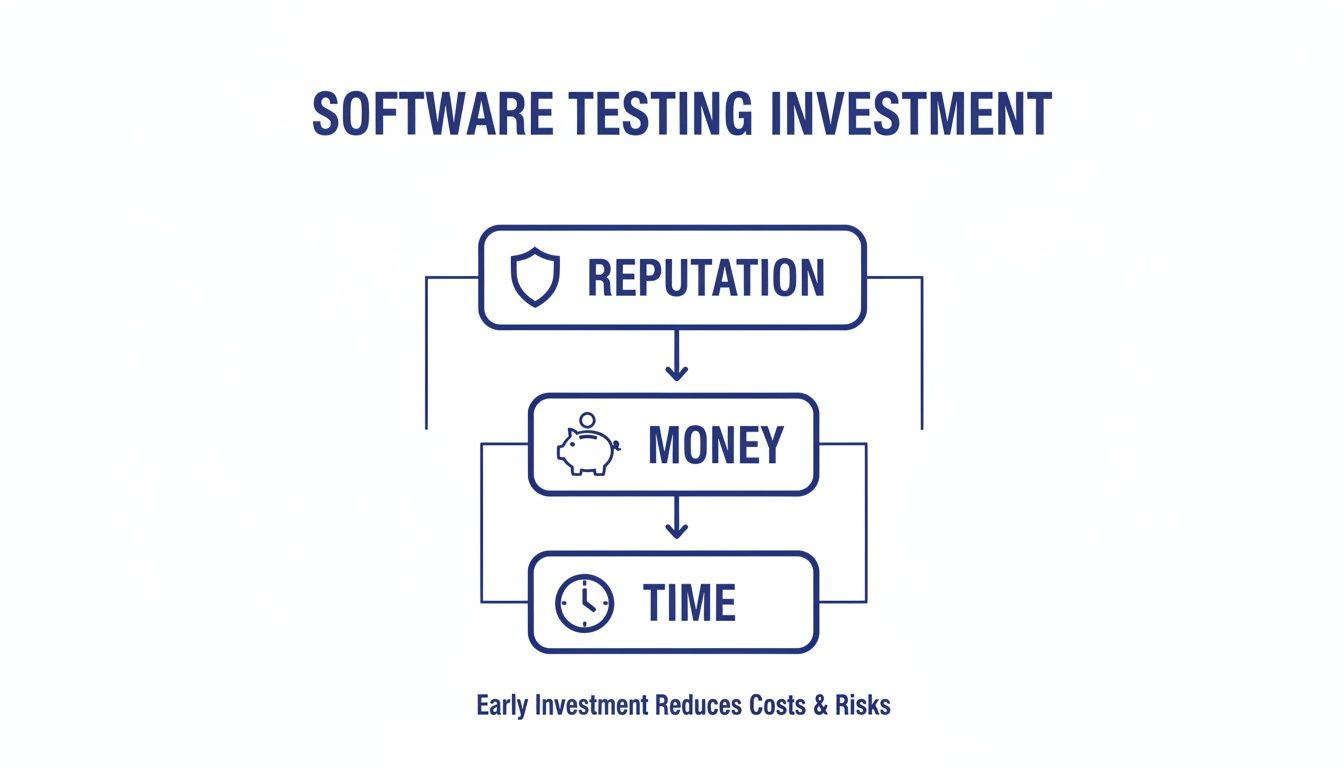
As you can see, a real commitment to quality assurance directly safeguards your reputation, your budget, and your development timeline by catching those costly issues early.
The Foundation: Unit and Integration Testing
We start at the smallest, most fundamental level with Unit Testing. Think of this as checking each individual brick before it even goes into the wall. Developers write small, automated tests to verify that a single function or component of the code—a 'unit'—works exactly as it should. It’s fast, happens constantly, and forms the first line of defence against simple bugs.
Next up is Integration Testing. Now that we know the bricks are good, we check how well they fit together. This layer ensures that different modules or services in your app can talk to each other without any misunderstandings. For example, does the login screen successfully pass the user's details to their profile page? Integration tests are all about finding faults in the seams between components.
The Big Picture: System and UI Testing
Once we’re confident the individual parts are working together, it's time for System Testing. This is where we step back and inspect the entire house to ensure it’s structurally sound and meets the original blueprint. Testers treat the app as a complete, unified product, checking that all features work together seamlessly from end to end and that it fulfils all the business requirements.
Working hand-in-hand with this is User Interface (UI) Testing. This crucial layer confirms that the app not only works correctly but is also a pleasure to use. Are the buttons clickable? Is the text readable? Does the layout look right on different screen sizes? This is absolutely vital for high-performance Flutter apps designed to run perfectly on both iOS and Android.
"Effective testing is a conversation between the present and the future. You're not just finding today's bugs; you're preventing tomorrow's failures."
Key Software Testing Types at a Glance
To make sense of these layers, it helps to see them side-by-side. Each plays a distinct role in building a stable, reliable app.
| Testing Type | Main Purpose | Scope | When to Use |
|---|---|---|---|
| Unit | Verify individual components work in isolation. | A single function or module. | Continuously, during development. |
| Integration | Ensure different components work together correctly. | Multiple interacting components. | After unit tests pass, before system testing. |
| System | Validate the entire application against requirements. | The full, integrated software. | After integration, before release. |
| UI/UX | Check the visual elements and usability. | The graphical user interface. | Throughout development, especially post-design. |
This table gives you a quick reference for the what, why, and when of the most common testing types you'll encounter.
The Non-Negotiables: Performance and Security
Finally, there are two specialist checks that you simply can't skip:
- Performance Testing: This answers the tough questions. "Can our app handle 1,000 users logging in all at once?" It measures the app's speed, responsiveness, and stability under different levels of stress and load.
- Security Testing: Think of this as hiring a professional to check all the locks and alarms on your newly built house. This type of testing actively searches for vulnerabilities and weaknesses that could be exploited to compromise user data or disrupt your service.
Each of these layers is guided by a specific set of instructions and goals. To get a better feel for how these are structured, you can read our practical guide on what is a test case in software testing. Getting your head around these different layers is fundamental to building a robust, reliable, and ultimately successful mobile app.
Choosing Your Strategy: Manual vs Automated Testing
Deciding between manual and automated testing isn’t about picking a winner; it's about choosing the right tool for the right job. Think of it like a master craftsperson versus a high-precision machine. You need both to build something truly exceptional, but they excel in completely different areas.
Making this strategic choice is one of the fundamentals of software testing, and getting it right helps you build a cost-effective and efficient quality assurance process that blends human insight with machine-like consistency.
The Human Touch of Manual Testing
Manual testing is exactly what it sounds like: a human tester interacts with your app just like a real user would. They tap, swipe, and explore, using their intuition and experience to find bugs a script might completely miss.
This hands-on approach is priceless for:
- Exploratory Testing: When you need someone to creatively "try and break" the app without being tied to a predefined script.
- Usability Feedback: Getting a real feel for the user experience—something a machine simply can't do. Is it enjoyable? Clunky? Confusing?
- Complex Scenarios: Testing intricate user journeys that are just too difficult or expensive to automate properly.
Of course, there are downsides. Manual testing can be slow, it's prone to human error (we all have off days!), and it just doesn't scale well for repetitive checks.
The Precision Engine of Automated Testing
This is where automated testing comes in. It uses scripts and software tools to run tests and report back on the results. It's the tireless, precision engine in your quality assurance toolkit, perfect for jobs that need to be done over and over again.
Automation really shines when it comes to:
- Regression Testing: Automatically checking that your latest code changes haven't accidentally broken something that was working perfectly yesterday.
- Performance Checks: Running load and stress tests to see how the app holds up when thousands of users are on it at once.
- Repetitive Tasks: Executing the same test cases across dozens of different devices and operating systems without getting tired or making a mistake.
While it's incredibly powerful, automation does require a significant upfront investment to create and maintain the test scripts. If you want to get into the nuts and bolts, you can learn more about what is automated testing and how it can boost your software quality.
The real goal isn't to choose one over the other. It's to create a hybrid strategy where automation handles the repetitive heavy lifting, freeing up your human testers to focus on what they do best: ensuring your users have a delightful experience.
This balanced approach is often visualised with the Testing Pyramid. The idea is to build a large base of fast, cheap automated unit tests, have a smaller middle layer for integration tests, and only a tiny number of slow, expensive manual UI tests at the very top. This structure gives you a stable and efficient foundation for your testing efforts. For anyone looking into web applications, understanding various browser automation techniques is a great place to start.
Adopting a Proactive Testing Mindset
For a long time, software development followed a pretty rigid script: build the thing, then test it right at the end to see what breaks. This last-minute scramble to find bugs is slow, expensive, and just doesn’t fly in modern app development. It’s like building an entire house and only checking if the foundations are solid once the roof is on.
Today, the sharpest teams have flipped this on its head. They embrace a proactive mindset, weaving testing into the very fabric of the development process from day one.
This is often called a "shift-left" approach, which simply means thinking about quality much earlier in the timeline. Testing stops being a final gatekeeper and becomes a collaborative partner in building the app. Two brilliant methodologies that bring this idea to life are Test-Driven Development (TDD) and Behaviour-Driven Development (BDD). Both help you build the right app, and build the app right.
Writing the Test Before the Code with TDD
Test-Driven Development sounds a bit backwards at first, but it's a game-changer. Instead of writing code and then figuring out how to test it, a developer using TDD follows a simple, powerful cycle:
- Write a Failing Test: First, the developer writes a tiny, automated test for a feature that doesn't even exist yet. Unsurprisingly, it fails.
- Write Code to Pass: Next, they write the absolute minimum amount of code needed to make that specific test pass. Nothing more, nothing less.
- Refactor and Improve: With the passing test acting as a safety net, the developer can now clean up the code, making it better and more efficient, confident that they haven't broken its core function.
This rhythm brings incredible focus. You can't write a test for a feature if you don’t know exactly what it’s supposed to do. For high-performance Flutter apps, this means cleaner, more reliable, and more maintainable code from the very beginning.
By defining the finish line before the race even starts, TDD ensures every line of code has a clear purpose. It’s not just about finding bugs; it’s about preventing them from ever being written in the first place.
Aligning Everyone with BDD
While TDD is brilliant for ensuring the code works correctly on a technical level, Behaviour-Driven Development (BDD) tackles a different, equally important question: are we building the right thing?
BDD is all about communication. It creates a common language that closes the gap between the business folks, the testers, and the developers. It uses a simple, human-readable format (a popular one is called Gherkin) to describe how the app should behave from a user’s point of view.
It looks something like this:
Scenario: User logs in with correct credentials Given a user is on the login screen When they enter a valid username and password Then they should be taken to their dashboard
This straightforward structure gets everyone on the same page. The product manager, designer, and developer can all agree on this behaviour before any code is written. It cuts out confusion and endless back-and-forth, ensuring the app you end up with is the app your business actually needs.
The Practical Side: Your Flutter Test Plan
Right, so you understand the theory behind testing, but how do you actually do it? This is where the real work begins, and a solid test plan is your secret weapon for a successful launch.
Think of it as the architectural blueprint for your quality assurance. It turns your high-level goals into a concrete set of actions, making sure everyone from your developers to your stakeholders is on the same page. Without one, you're essentially flying blind. With one, you have a clear, documented strategy that guarantees a much higher-quality Flutter app.

This kind of structured approach to quality is precisely why we're seeing huge investment in the field. With Flutter's performance setting new benchmarks for cross-platform development, the demand for high-quality apps that work perfectly is higher than ever. In fact, the UK software testing market is set to more than double, rocketing from USD 45.2 billion to an estimated USD 99.9 billion between 2025 and 2033, driven by the need for flawless app experiences.
Key Components of a Flutter Test Plan
So, what goes into a good test plan? Here’s a checklist you can adapt for your own project. Use it as a framework to guide conversations with your development team and make sure no stone is left unturned.
- Define the Scope and Objectives: First things first, what are you actually testing? Be crystal clear about what’s in and what’s out. Is this test cycle focused only on new features, or are you running a full regression test on the entire app?
- Identify Target Devices and Platforms: Nail down the exact iOS and Android versions your Flutter app needs to support. You’ll want to list specific device types and screen sizes (e.g., iPhone 14, Samsung Galaxy S23, various tablets) to guarantee a consistent experience for everyone.
- Set Clear Pass/Fail Criteria: What does "working" actually mean? This needs to be completely unambiguous. For instance, a good criterion would be: "The login process must complete within 2 seconds on a stable 4G connection."
- Outline Resources and Tools: Who is doing what, and with which tools? List the people responsible for testing and the software you'll be using, like automated testing frameworks or bug-tracking tools such as Jira. For a deeper dive into Flutter's built-in capabilities, check out our developer's guide to the basics of testing in Flutter.
- Develop Test Cases: This is the real heart of your plan. Write out detailed, step-by-step instructions for testers to follow. These should cover every single feature you defined in your scope. To make sure these are well-written and easy to follow, it’s a great idea to integrate software documentation best practices from the very beginning.
- Establish a Realistic Schedule: Set firm deadlines for each testing phase—preparation, execution, bug fixing, and re-testing. A proper timeline keeps the project on track and manages everyone’s expectations.
By taking the time to document these key areas, you're creating a single source of truth for your app's quality. It empowers your team to deliver a polished, reliable product that users will love from day one.
Common App Testing Pitfalls and How to Sidestep Them
Even the most brilliant app idea can be torpedoed by testing mistakes that are surprisingly easy to avoid. For startups and small businesses, getting a handle on software testing often starts with knowing what not to do. By spotting these common traps early, you can build a solid quality assurance process from day one and turn potential failures into a real competitive advantage.
One of the most frequent errors we see is treating testing as an afterthought. Teams will often sprint through development, pushing quality checks to the last few days before a launch. This always ends in a panicked scramble to fix bugs, leading to delays and compromises that ultimately hurt the user experience. The only real solution is to weave testing into your process from the very beginning.
Another classic pitfall is working with vague or poorly defined requirements. When your developers and testers aren't on the exact same page about what a feature should do, they end up testing against different expectations. It’s a surefire way to waste time and build features that don't solve the real business problem.
Overlooking Crucial Non-Functional Tests
Many teams get laser-focused on making sure features work, but they completely forget to test how well they work under pressure. This leads to two critical, and often fatal, omissions:
- Neglecting Performance: Your app might run flawlessly for one person, but what happens when a hundred people try to use it at once? Skipping performance and load testing is a recipe for crashes, slowdowns, and unhappy users as your app starts to grow.
- Ignoring Security: In an age of endless data breaches, security testing isn’t a nice-to-have; it's essential. Overlooking this can expose your users' private data, destroy their trust, and inflict serious, sometimes permanent, damage to your brand’s reputation.
Just look at the financial services sector. It’s projected to hold a massive 31% share of the UK software testing market in 2025, largely because they can't afford to get this wrong. With over 90% of Brits now using mobile banking, the need for flawless performance and ironclad security is non-negotiable. You can dive deeper into this with KPMG's detailed market analysis.
A final, critical mistake is simply poor communication. When development and QA teams operate in separate silos, misunderstandings and friction are inevitable. You have to foster a collaborative culture where testers are involved in planning discussions right from the start. That's how you ensure everyone is pulling in the same direction, towards the same goal: a high-quality, successful app.
Your Software Testing Questions Answered
When you're launching an app, especially as a startup or small business, a lot of questions about testing can pop up. Let's tackle some of the most common ones we hear, giving you the straightforward answers you need to get quality assurance right.
How Much Should I Budget for Software Testing?
It's a classic question, and a good rule of thumb is to set aside 15-25% of your total development budget for quality assurance. Think of this as an investment, not just a cost. Smart, proactive strategies like running automated tests continuously can actually bring this number down over time. It’s all about catching bugs early when they’re cheapest and easiest to fix.
Do I Need a Dedicated QA Team for My Startup?
In the very beginning, probably not. Your developers can—and should—handle writing their own unit and integration tests as they build the app. But as your application gets more complex, bringing in a dedicated QA professional, even part-time, becomes invaluable. They offer a fresh, unbiased perspective on how the app really works for a user, spotting issues that the developers who built it might naturally overlook.
Investing in a quality process early on is less about finding bugs and more about building user trust. A flawless experience is your most powerful marketing tool.
Is It Safe to Skip Testing on a Simple App?
Honestly, skipping testing is a risk you can't afford to take, no matter how simple your app seems. Even the most basic applications can hide critical flaws. A crash here, a broken button there—these small failures lead to user frustration, a flood of negative reviews, and can seriously tarnish your brand's reputation right out of the gate. A basic test plan that covers your core features is non-negotiable for ensuring a great first impression.
Ready to build a high-performance, thoroughly tested Flutter app? The expert team at App Developer UK is here to bring your vision to life with a focus on quality from day one. https://app-developer.uk