Architecting for AWS A Guide to Building Modern Cloud Apps
Architecting for AWS A Guide to Building Modern Cloud Apps
Architecting for AWS is all about the strategy behind designing your applications. It’s about picking the right mix of Amazon Web Services tools and applying smart design principles to build something that's secure, tough, fast, and doesn't burn a hole in your pocket. Get it right, and you'll have an app that can grow and change with your business.
Building Your Foundation in AWS Architecture
Opening the AWS console for the first time is a bit like stepping onto the flight deck of a spaceship. You’re hit with a dizzying array of blinking lights and complex controls. With hundreds of services on offer, it’s easy to feel lost. But here's the secret: architecting for AWS isn't about memorising every single service. It's about creating a solid blueprint for your application.
This blueprint is what makes your app resilient when things go wrong, secure against threats, and smart with its resources. Think of it like building a house. You wouldn't just start laying bricks without a detailed architectural plan. A good plan considers the foundation, the structural integrity, the plumbing, and the electrics long before the first wall goes up. In the same way, a strong AWS architecture plans how all the pieces will fit together to support your app.

Your North Star: The Well-Architected Framework
Thankfully, you don't have to figure it all out alone. To guide you, AWS created the Well-Architected Framework. This isn't a rigid rulebook but a collection of best practices and core ideas designed to help you build the best possible systems on the cloud. A solid start begins with understanding these principles. For a deeper dive, this introduction to the AWS Well-Architected Framework is a great resource that breaks down the fundamentals.
The framework is built on five key pillars, which act as your guideposts for making design decisions.
| The Five Pillars of the AWS Well-Architected Framework | |
|---|---|
| Pillar | Core Principle |
| Operational Excellence | Running and monitoring systems to deliver business value and continually improving processes. |
| Security | Protecting information and systems through risk assessments and mitigation strategies. |
| Reliability | Ensuring a workload performs its intended function correctly and consistently when expected. |
| Performance Efficiency | Using computing resources efficiently to meet requirements as demand changes. |
| Cost Optimisation | Avoiding or eliminating unneeded costs without sacrificing performance or security. |
Sticking to these pillars helps you sidestep costly mistakes and avoid racking up technical debt down the line. To get a better handle on the basics, you can read our guide that explains what is software architecture in simple terms.
Why Architecture Matters for High-Performance Apps
For a high-performance Flutter app, every millisecond of latency in the backend counts. A shaky architecture can lead to slow load times, frequent outages, and a frustrating user experience that sends people running.
For businesses in the UK, getting this right is more important than ever. The UK cloud computing market, where AWS is a major player, hit an estimated £41 billion in 2022 and is on track to reach £59 billion by 2024. This massive growth shows just how many UK organisations are turning to AWS to build highly available and scalable applications.
A well-planned architecture isn't an expense; it's an investment in your application's future success. It provides the stability and scalability needed to grow your user base without compromising on performance or reliability.
By focusing on a strong foundation from day one, you build a system that can evolve with your business, handle unexpected traffic spikes, and deliver the seamless experience your users demand. This initial planning is easily the most important step in your entire cloud journey.
Choosing Your Core Architectural Pattern on AWS
Once you've got your foundation sorted, the next big decision is picking your core architectural pattern on AWS. Let’s be clear: there's no silver bullet here. The "best" choice is completely tied to what your app needs to do, what your team already knows, and where you want to go in the long run. Getting this right impacts everything—from how fast you can build things to how well you can scale, and of course, how much it all costs.
Think of these patterns like different engines for a car. A simple, reliable petrol engine is great for the daily commute. A high-performance hybrid makes sense when you need both power and efficiency. And a massive diesel engine is what you pick for serious heavy lifting. Choose the wrong one, and you're in for a world of frustration. We'll break down the three main patterns that modern app teams are using today.
The Agility of Serverless
The serverless pattern is all about speed and simplicity. Instead of worrying about servers, you write small pieces of code—functions—that spring into action when something specific happens. This could be an API call from your app, a new file being uploaded, or a user signing up. In the AWS world, AWS Lambda and API Gateway are the heart and soul of this approach.
This model is a fantastic fit for workloads that are unpredictable or don't run all the time. Imagine your Flutter app's backend: you could have a Lambda function that fires up to process a new user registration, another to resize a profile picture, and one more to send out a push notification. You only pay for the split seconds your code is actually running. It’s incredibly cost-effective. If this sounds like your path, getting familiar with these AWS Lambda best practices will help you make smart choices and sidestep common rookie mistakes.
The real magic of serverless is that it completely abstracts away the infrastructure. Your team gets to pour all their energy into writing great code that solves business problems, not patching servers or managing operating systems.
This intense focus on code, not infrastructure, is a massive accelerator for development. It lets even a small team build and launch a system that can scale to millions of users—something that used to require a whole team of operations specialists.
The Power and Portability of Containers
Containers, typically managed with services like Amazon ECS (Elastic Container Service) or its Kubernetes-based sibling EKS (Elastic Kubernetes Service), offer a brilliant middle ground. The idea is to package your application and everything it needs to run into a neat, standardised box—a container—that behaves the same way no matter where you run it.
This approach really shines when you're building a complex app using a microservices architecture. This is where you break your big application down into lots of smaller, independent services. For an e-commerce platform, you might have separate containerised services for user accounts, the product catalogue, and the payment gateway. This separation is key, as it lets different teams work on, deploy, and scale their own service without tripping over each other.
With containers, it all comes down to a trade-off between control and complexity.
- Greater Control: You get to decide exactly what goes into your container—the operating system, the libraries, the runtime. This is a lifesaver for apps with very specific dependencies.
- Increased Responsibility: The flip side is that your team is now in charge of building the container images, orchestrating how they all work together, and managing the networking between them. This is definitely more hands-on than going serverless.
Monoliths and the Path to Modernisation
And then we have the traditional monolithic pattern. This is where your entire application is built as a single, unified codebase, often running on Amazon EC2 virtual servers. While "monolith" sometimes gets a bad rap, it can absolutely be the right call for a new project, especially with a small team and clear requirements. It’s just simpler to get started when everything is in one place—building, testing, and deploying is more straightforward at the beginning.
The trouble starts when that monolith grows. It can become a real beast to manage, and updates become slow and risky. A tiny change might force you to redeploy the entire application, which is always a nerve-wracking process. This is exactly why so many organisations start to move from a monolith to microservices over time. The good news is that AWS has tools to make this journey less painful. You can start by chipping off small pieces of the monolith and rebuilding them as separate serverless functions or containerised services, modernising your architecture one step at a time without a massive "big bang" rewrite.
Designing Secure and Resilient Cloud Networks
When you start architecting on AWS, it's helpful to think of your network setup like building a digital fortress. Your Amazon Virtual Private Cloud (VPC) isn't just a technical term; it's your own private, fortified island in the vast AWS ocean. This gives you a completely isolated section of the cloud to launch your resources, putting you in full control of your application's environment.
This isolation is the bedrock of good security. It prevents your app's components from just floating around on the public internet, exposed to anyone who happens to pass by. Instead, you get to build the walls, set up the gates, and post the guards to protect your valuable data and infrastructure.
Building Your Digital Moat With Subnets
Inside your VPC fortress, the next step is creating subnets. You can think of these as different security zones within your walls. The most effective strategy, and the one you'll see most often, is to split them into public and private zones.
- Public Subnets: This is the outer courtyard of your fortress. It has a direct connection to the internet and is home to resources that absolutely need to be publicly accessible, like the web servers or load balancers that greet traffic from your Flutter app.
- Private Subnets: This is the inner keep, totally sealed off from direct internet access. Your most sensitive assets—databases, backend processing jobs, and internal APIs—live here. They can talk to the public subnet when needed, but they remain completely invisible to the outside world.
This public/private split is your first and most critical line of defence. It means a malicious actor can't even try to connect to your database from the internet because, quite simply, there's no path for them to get there.
This kind of strategic thinking around security is driving huge adoption in the UK. Architecting on AWS has seen explosive growth, with customer numbers jumping a staggering 357% since 2020. UK startups, building secure systems with tools like VPCs, have increased by 257%. And when you consider that security breaches hit around 36% of businesses, it’s no wonder architects are using services like AWS GuardDuty to lock down their environments. You can check out more stats on the AWS market landscape over at hginsights.com.
The diagram below shows how some of the core architectural patterns fit within these secure network designs.
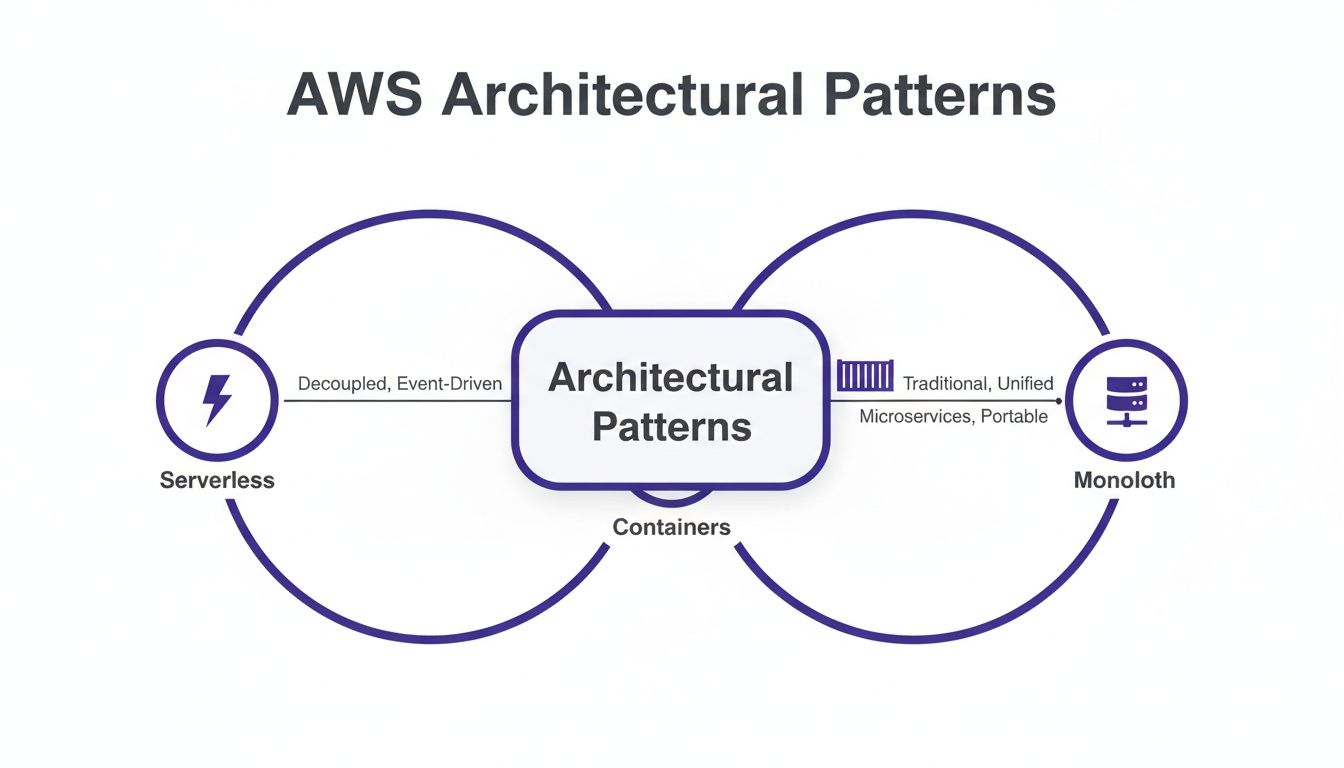
This gives you a feel for how different approaches like Serverless, Containers, and even traditional Monoliths can be organised securely, each bringing its own set of trade-offs to the table for your application.
Intelligent Gatekeepers for Traffic Control
Just having walls and zones isn't enough; you need smart gatekeepers. In AWS, this is handled by two key services: Security Groups and Network Access Control Lists (NACLs).
Think of a Security Group as a bouncer at a club door, checking the ID of everything trying to get into (or out of) your individual servers (like an EC2 instance). You set the rules, like "Only allow web traffic on port 443 from anywhere" for your web servers, and it enforces them.
NACLs, on the other hand, are like checkpoints at the border of your security zones. They act as a firewall for an entire subnet, controlling traffic that flows in and out of that whole area. They're a broader, secondary layer of defence.
Mastering Identity and Access Management (IAM) is not just a best practice; it is your primary defence against unauthorised access and potential data breaches. Properly configured IAM is the backbone of a secure AWS architecture.
Mastering Who Can Do What
Beyond the network itself, real security comes down to controlling who can do what. This is where AWS Identity and Access Management (IAM) comes in. It’s the service that lets you manage access to everything in your AWS account, and the golden rule here is the principle of least privilege.
This is a simple but powerful idea: you should only ever grant the absolute minimum permissions necessary for a user or a service to do its job. So, instead of giving a developer full admin access, you create an IAM Role with a specific policy that says, "This role is only allowed to deploy code to this specific server and can do nothing else." This single practice dramatically shrinks your attack surface.
For a deeper dive into how these principles work in the real world, our team offers cybersecurity consulting services to protect your business. By combining a well-designed VPC with strict IAM policies, you build a multi-layered security posture that is both tough and resilient.
Selecting the Right Data and Storage Solutions
The performance, scalability, and even the final cost of your application are all tied directly to your data strategy. When you're building on AWS, you're faced with a massive portfolio of storage and database services, and picking the right tool for the job is one of the most critical decisions you'll make. Get it right early on, and you set yourself up for success; get it wrong, and you could be looking at performance bottlenecks and painful, expensive migrations down the road.
Think of the AWS storage options as a specialist’s toolkit. You wouldn't use a sledgehammer to hang a picture frame, would you? It’s the same principle here. The service you choose has to match the kind of data you're handling and how you plan to use it. This decision directly impacts how quickly your app can fetch and update information, which is everything when it comes to a smooth user experience.
Unpacking Your Storage Options
The first big split you'll encounter in AWS storage is between object, block, and file storage. Each one is purpose-built for a different job, and knowing the difference is fundamental to a solid architecture.
- Amazon S3 (Simple Storage Service): This is your go-to for object storage. The best way to think of it is as a practically limitless digital warehouse for unstructured data. It's the perfect home for user-uploaded images and videos, application backups, or the static assets for a website. S3 is engineered for immense durability and scale, making it an incredibly reliable and cheap option for data that doesn't need to change often or be accessed with lightning speed.
- Amazon EBS (Elastic Block Store): In complete contrast, EBS provides block storage. This behaves just like a high-performance hard drive plugged directly into your servers (your EC2 instances). This is where you put anything that needs rapid, low-latency access, like the server's operating system or a database that demands fast read/write operations.
- Amazon EFS (Elastic File System): Bridging a gap between the two, EFS offers shared file storage. It lets you create a file system that can be mounted and accessed by multiple servers at the same time. This is ideal for things like a central content management system or shared development environments where many different parts of your application need to get to the same set of files.
Making the right choice here is a foundational step. A mismatch can lead to sluggish performance or a surprisingly high bill, so always match the service to your data's access pattern.
Databases: Relational vs. NoSQL
Once your files and objects have a home, it's time to think about the heart of your application: its core data. This brings us to the great database debate—relational versus NoSQL. Thankfully, AWS has world-class options in both camps.
Amazon RDS (Relational Database Service) is a managed service that takes the pain out of setting up, running, and scaling traditional relational databases like MySQL, PostgreSQL, or SQL Server. Relational databases are the champions of transactional integrity. They use a highly structured schema with tables, rows, and columns, which is perfect for data where consistency and complex relationships are non-negotiable. Think financial records, e-commerce orders, or any business logic where every piece of data has to be perfectly in sync.
On the other side of the fence is Amazon DynamoDB, AWS's flagship NoSQL database. DynamoDB is all about three things: speed, flexibility, and massive scale. It's a beast at handling unstructured or semi-structured data, delivering blazing-fast, single-digit millisecond performance no matter how big it gets.
For a high-performance Flutter app, DynamoDB is often the perfect backend for storing things like user profiles, session data, or real-time chat messages. Its sheer speed ensures the snappy, responsive user interface that modern users demand.
The beauty of NoSQL is that you don't need a rigid schema upfront. This flexibility lets you iterate and evolve your app's data model far more easily, which is a massive advantage in modern development where agility is key. Your database will often talk to your app via APIs, and our guide on what is API integration explains more about how these pieces connect.
To help you decide, here’s a quick comparison of where each service shines.
AWS Storage and Database Service Comparison
| Service | Type | Ideal Use Case |
|---|---|---|
| Amazon S3 | Object | Storing large, unstructured files like images, videos, and backups. It's highly durable and cost-effective for data that is not frequently changed. |
| Amazon EBS | Block | Serving as the primary hard drive for your EC2 instances. It's designed for high-performance, low-latency access required by operating systems and databases. |
| Amazon RDS | Relational | Managing structured data with complex relationships and transactional needs. Perfect for financial systems, e-commerce platforms, and applications requiring strong data consistency. |
| Amazon DynamoDB | NoSQL | Powering applications that need extremely fast, consistent performance at any scale. Ideal for mobile app backends, gaming leaderboards, and real-time applications where milliseconds matter. |
At the end of the day, most modern applications don't just pick one. They use a hybrid approach. You might lean on RDS for your core transactional data, use DynamoDB for high-velocity user activity, and store all your media in S3. Smartly combining these services is the hallmark of a truly effective AWS architect.
Automating Deployments and Achieving Observability
A world-class architecture on paper is only half the battle. The real test comes when you move from design to day-to-day reality. How reliably can you push new features? And once they’re live, how well can you actually see what’s happening inside your system? This is where your strategy for automation and observability becomes make-or-break.
Let's be honest: manually deploying code is slow, risky, and a recipe for human error. A robust Continuous Integration and Continuous Deployment (CI/CD) pipeline automates this entire process. It transforms your release cycle from a stressful, all-hands-on-deck event into a routine, predictable workflow. Think of it as the difference between hand-crafting every car part versus having a modern, automated assembly line.
Building Your Automated Assembly Line
AWS gives you a whole suite of developer tools that slot together perfectly to create a powerful, end-to-end pipeline. It helps to think of them as specialised stations on your assembly line, each handling a specific job.
- AWS CodeCommit: This is where it all starts. It's a secure, managed source control service that hosts your private Git repositories. Essentially, it’s the warehouse where the blueprints for your application—your code—are safely stored.
- AWS CodeBuild: From the warehouse, your code moves to CodeBuild. This is a fully managed build service that compiles your source code, runs all your tests, and churns out software packages ready for deployment. It’s the quality assurance step, making sure every component is built to spec.
- AWS CodeDeploy: Once a build is approved, CodeDeploy takes the baton, automating the deployment of your application to services like Amazon EC2, AWS Fargate, or AWS Lambda. It’s smart enough to handle the complexities of updating your app with minimal, if any, downtime.
- AWS CodePipeline: This is the conductor of the whole orchestra. CodePipeline is what models, visualises, and automates the entire release process, connecting all the other services in a logical flow from the moment you check in your code to the final deployment.
Put them all together, and you have a repeatable, reliable system. It catches bugs early and massively accelerates the speed at which you can deliver real value to your users.
Seeing Inside Your Live Application
Getting your code deployed is just the beginning. Once it’s running in the wild, you need deep visibility into its health and performance. This is observability—not just knowing that something is wrong, but being able to quickly figure out why.
Observability is all about instrumenting your systems so they provide data that can answer questions you didn't even know you needed to ask. It's the shift from reactive troubleshooting to proactive performance optimisation.
AWS offers two core services that are indispensable here. First, Amazon CloudWatch acts as your central hub for collecting logs, metrics, and events. It pulls in performance data from pretty much every AWS service you can think of, giving you a comprehensive dashboard of resource usage, app performance, and operational health.
But when you're dealing with a distributed system like microservices, tracking a single user request as it bounces between different services can be a nightmare. This is where AWS X-Ray shines. It traces requests from end to end, helping you visualise the entire journey, identify performance bottlenecks, and pinpoint the exact service that’s causing a slowdown.
UK organisations building on AWS are tapping into a seriously powerful and growing ecosystem. AWS recently posted $24.9 billion in operating income and is funnelling $100 billion into AI expansions, which directly benefits services you can monitor, like SageMaker pipelines. For UK small and medium-sized businesses—a group growing at 28% year-over-year on the platform—these observability tools are absolutely critical for keeping costs and performance in check. You can dig deeper into these AWS growth statistics and their impact.
Optimising Your Architecture for Cost and Performance
It's one thing to build a powerful application on AWS; it’s another thing entirely to make sure it doesn't land you with a terrifying monthly bill. Architecting for AWS is a constant balancing act between peak performance and keeping your finances in the green. It’s surprisingly easy to overspend on resources you aren't even using if you don't have a clear strategy from the outset.
This financial discipline starts with mastering the art of right-sizing. A common mistake many teams make is to overestimate their needs, provisioning massive, expensive servers that end up sitting idle most of the time. Right-sizing isn't a one-off task; it's the continuous process of matching your instance types and sizes to what your workload actually demands, ensuring you only pay for what you genuinely need.
Smart Pricing and Automated Scaling
Beyond just picking smaller servers, you can slash your costs by getting to grips with AWS's flexible pricing models. Sticking with the standard on-demand rate isn't always the most cost-effective route.
- Savings Plans: These are perfect for predictable, steady workloads. In exchange for committing to a certain amount of usage over one or three years, you get a much lower price.
- Spot Instances: Got a fault-tolerant workload like batch processing or data analysis? You can use Spot Instances to tap into spare EC2 capacity at incredible discounts of up to 90%.
A core principle of good AWS architecture is designing systems where costs automatically follow demand. Services like Auto Scaling can dynamically add or remove servers based on real-time traffic, so you’re not footing the bill for peak capacity during quiet periods. Even better, serverless architectures built with AWS Lambda have a pay-per-use model baked in, which completely eliminates costs for idle time.
Cost optimisation isn't a task you tick off a list. It's an ongoing architectural principle. The real goal is to build systems where your spending naturally scales up and down with user activity, creating a direct link between your AWS bill and the value you're delivering.
Taking Control with Cost Management Tools
Guesswork has no place in cost management. Thankfully, AWS provides some powerful tools to turn it into a data-driven process, giving you the visibility you need to make smart architectural decisions.
AWS Cost Explorer gives you a clean, intuitive interface to see where your money is going over time. You can slice and dice your costs by service, account, or even custom tags, helping you pinpoint exactly which parts of your architecture are driving the bill.
For more proactive control, AWS Budgets lets you set your own spending limits. You’ll get alerts when your costs or usage are about to cross a threshold you’ve defined. This essentially turns your financial plan into an automated guardrail, stopping unexpected budget blowouts before they happen. By making these tools a regular part of your workflow, you can continuously refine your architecture, keeping it both high-performing and financially efficient.
Frequently Asked Questions About Architecting for AWS
Jumping into AWS architecture always brings up a few common questions. To save you from digging through pages of documentation, here’s a quick rundown of the things teams most often ask when they’re getting started.
What Is the AWS Shared Responsibility Model?
This is a core idea you absolutely need to grasp for cloud security. The simplest way to think about it is as a partnership. AWS takes responsibility for the security of the cloud itself. This means they handle the physical security of their data centres, the hardware, and the underlying software that makes all their services run.
Your responsibility is everything you put in the cloud. That’s your code, your data, and how you configure everything. You’re in charge of managing who has access with IAM, encrypting your data, setting up your network firewalls (like Security Groups), and making sure your own application is secure.
How Should We Manage Infrastructure as Code?
Infrastructure as Code (IaC) is the practice of defining your cloud resources in configuration files instead of clicking around the AWS console to create them manually. For this, the two main players are AWS CloudFormation (Amazon’s own tool) and HashiCorp Terraform.
Honestly, using IaC isn’t optional for any serious project. It makes your setup repeatable, auditable, and much easier to manage as your application grows. If you're starting something new, build it with IaC from day one.
The real question isn't if you should use Infrastructure as Code, but which tool makes the most sense for your team. Both CloudFormation and Terraform are fantastic choices for building on AWS.
Which Services Are Best for a New Flutter App Backend?
When you’re building a backend for a new Flutter app, going serverless is almost always the quickest and most cost-effective way to start. We know from benchmarks that Flutter leads the pack on performance, and a sluggish backend will completely undermine that snappy user experience.
A brilliant, go-to combination for this is:
- AWS Lambda: This lets you run your backend code without ever thinking about a server.
- Amazon API Gateway: Use this to build the secure and scalable APIs that your Flutter app will communicate with.
- Amazon DynamoDB: A lightning-fast NoSQL database that’s perfect for user data and can deliver responses in single-digit milliseconds.
This setup scales up or down automatically based on traffic, and you only pay for what you actually use. That makes it perfect for new projects or startups where you can’t predict user demand.
Ready to build a high-performance, scalable backend for your mobile application? The expert team at App Developer UK specialises in creating robust cloud architectures to power stunning Flutter apps. Get in touch with us today to bring your vision to life.