What is entity relationship diagram: A Developer's Guide to ERDs
What is entity relationship diagram: A Developer's Guide to ERDs
Ever heard the phrase "measure twice, cut once"? An Entity Relationship Diagram (ERD) is the digital equivalent for your app's data. Think of it as the architectural blueprint for your entire data structure, sketched out long before a single line of code gets written.
It’s a simple flowchart that shows all the moving parts of your system—like customers, products, and orders—and, crucially, how they all connect to one another.
Understanding Your App's Blueprint

Imagine trying to build a house without a blueprint. You'd likely end up with doors that open into walls or a kitchen with no plumbing. An ERD prevents that exact kind of chaos for your app, making sure every piece of information has a logical home and a clear relationship with everything else. This structured thinking is the bedrock of stable, scalable software.
For any app, but especially for high-performance mobile apps built with frameworks like Flutter, a solid data structure is non-negotiable. A clear ERD means the backend database will be efficient, which directly translates to a faster, smoother experience for your users. It also acts as a common language, getting UK business stakeholders and our development team on the same page from day one.
The Foundation of Logical Database Design
At its heart, an ERD is all about modelling your data storage needs. It forces you to think through the big questions right at the start:
- What are the main "things" we need to keep track of? (e.g., Users, Posts, Comments)
- What specific details do we need to store about each of those things? (e.g., a User has a name and an email)
- How do these things actually interact? (e.g., a User writes a Post)
By answering these questions visually, an ERD creates a robust foundation for the database schema. This upfront planning saves a world of pain later, slashing the need for costly redesigns and simplifying the entire development journey.
While ERDs are the go-to for designing relational databases, it’s worth knowing they aren't the only game in town; other options like nonrelational databases solve different kinds of problems. To get a better handle on the fundamentals, check out our full guide explaining in more detail what an entity relationship diagram is.
The Three Building Blocks of Every ERD
Every Entity Relationship Diagram, no matter how complex it looks, is built from just three core components. Once you get your head around these fundamental building blocks, you're well on your way to creating and reading these powerful data blueprints.
Think of them as the basic grammar for your database design: the nouns, the adjectives, and the verbs that bring it all to life.
First up, we have Entities. An entity is simply a distinct object or concept in your system that you need to store information about. They are the main nouns of your database. For a simple e-commerce app, your key entities would likely be things like ‘Customer’, ‘Product’, and ‘Order’.
Each entity acts as a placeholder for a group of similar items. So, the ‘Customer’ entity doesn't represent one specific person, but the idea of all the customers who will ever use your app. In the UK's bustling tech scene, ERDs are a foundational tool for app developers. With 7,892,598 active businesses in the United Kingdom, robust data modelling is essential to manage the complex web of relationships between customers, orders, and stock. You can dive deeper into UK business data with Techsalerator's comprehensive database.
Defining Entity Characteristics with Attributes
Once you’ve identified your entities, you need to describe them. This is where Attributes come into play. Attributes are the properties or characteristics that define an entity—think of them as the adjectives that add detail to your nouns. They spell out exactly what information you plan to collect for each entity.
For our ‘Customer’ entity, the attributes might include:
- CustomerID: A unique number to identify each person.
- FirstName: The customer’s first name.
- EmailAddress: Their contact email.
- Postcode: Their delivery location.
Likewise, a ‘Product’ entity would naturally have attributes like ‘ProductID’, ‘ProductName’, ‘Price’, and ‘StockQuantity’. When you build the database, these attributes become the columns in your table, ready to hold the specific data for each entry.
This diagram shows how a ‘Car’ entity is fleshed out by its attributes, such as ‘Registration’, ‘Make’, and ‘Model’.
This simple visual makes it perfectly clear how the main concept (the entity) is separate from its descriptive properties (the attributes).
Connecting the Dots with Relationships
The final, and arguably most important, piece of the puzzle is the Relationship. Relationships are the verbs of an ERD. They show how two or more entities are connected or associated with each other, defining the logic and business rules of your entire system. Without them, you’d just have a bunch of disconnected lists.
An ERD isn't just about listing what you want to track; it's about defining the logical connections that turn isolated data points into a cohesive, functional system.
For example, a ‘Customer’ entity and an ‘Order’ entity are obviously linked. We could name this relationship "places", as in, a ‘Customer’ places an ‘Order’. This connection is vital because it establishes that an order can't exist without a customer. In the same way, a ‘Product’ might be "included in" an ‘Order’, linking those two entities together. It's these verbs that truly make your data model work.
Mapping Data Rules with Cardinality and Notation
Once you've got your core building blocks sorted—the entities and their attributes—the next step is to figure out the rules of engagement. How do they interact? This is where cardinality comes into play.
Think of it as setting the ground rules for your data. It answers fundamental questions like, "How many orders can one customer have?" or "Can a single product belong to multiple categories?" Getting this right isn't just a technical exercise; it's about translating real-world business logic into a structured model. It stops illogical things from happening, like an order magically appearing without a customer attached to it.
This is the basic grammar of database design: an Entity (like a User) is described by its Attributes (like a name or email) and connected to other entities through a Relationship.
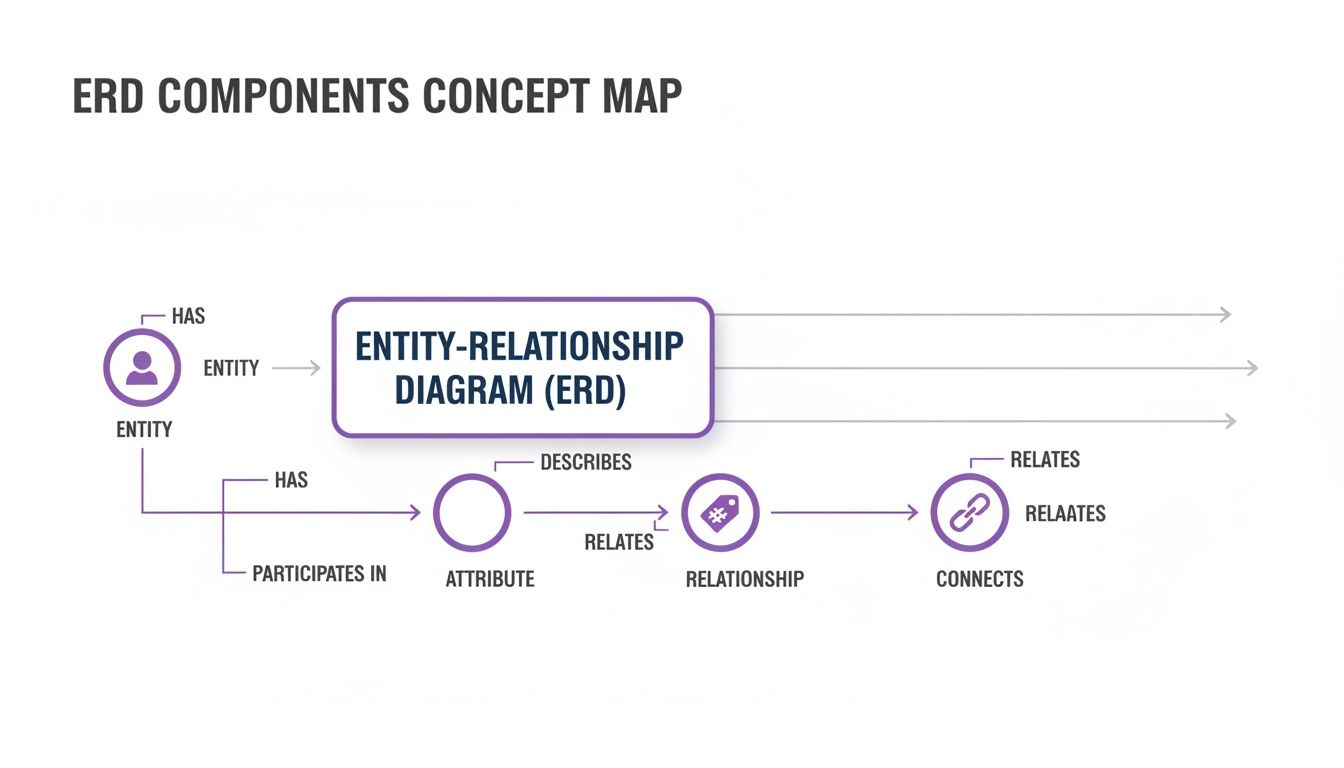
This simple flow shows how these core components link up to form the foundation of any ERD.
Understanding Relationship Types
In practice, cardinality usually boils down to three main types of relationships. Each one models a different kind of interaction you’ll see all the time in app development.
- One-to-One (1:1): This one's straightforward. One instance of an entity is tied to exactly one instance of another. For example, a User has exactly one UserProfile. You wouldn't expect a single user to have multiple, separate profiles in most systems.
- One-to-Many (1:N): This is probably the most common relationship you'll encounter. It means one thing can be linked to many other things. The classic example is a Blogger who can write many Posts, but each post is written by just one blogger.
- Many-to-Many (M:N): This happens when many instances on one side can be linked to many instances on the other. Think about a Student who can enrol in many Courses, while each Course can have many Students. These relationships usually need a go-between, often called a junction or linking table, to work properly in a real database.
The Language of Crow’s Foot Notation
To actually draw these rules out, developers and designers need a common visual language. While there are a few out there, Crow’s Foot notation is incredibly popular because it’s so easy to read. It uses simple symbols at the ends of the lines connecting entities to show the cardinality.
Crow’s Foot notation is like a universal shorthand for your data rules. It makes complex logic instantly understandable, even for non-technical team members, without needing a deep dive into database theory.
The symbols are simple enough to sketch on a whiteboard:
- A single straight line means "one".
- A circle means "zero".
- The three-pronged shape that looks like a bird's foot means "many".
By combining them, you can clearly show rules like "one and only one," "zero or one," or "one or many." This visual clarity makes ERDs a fantastic communication tool, allowing the whole team to agree on the database logic before a single line of code is written. For a more detailed walkthrough, check out our guide on how to create ERD diagrams. Getting this right from the start is key to building a solid, error-free database.
Putting ERDs into Practice with Real-World Examples
All the theory is great, but an Entity Relationship Diagram really comes alive when you apply it to a real-world problem. Seeing an ERD in action is what truly shows how it translates abstract business ideas into a logical, visual plan. So, let's step away from the concepts and look at two practical examples that are highly relevant for modern app development.
We'll start with a classic e-commerce setup and then explore a content-sharing app. Both will show just how vital these diagrams are as a roadmap for development.
Example One: A UK E-commerce Store
Imagine you're building an online shop from the ground up. Before a single line of code is written, you need a clear plan for how to track customers, the products they buy, and the orders they place. An ERD is the perfect tool for mapping this out.
First, we identify our main entities:
- Customer: Represents the people making purchases.
- Product: Represents the items you have for sale.
- Order: Represents a single transaction made by a customer.
With our entities defined, we figure out how they relate to one another using those cardinality rules we touched on earlier. A Customer can place one or many Orders, but each Order belongs to only one Customer. That’s a classic one-to-many relationship. Simple.
Things get a little more complex with products. An Order can contain many Products, and a single Product can appear in many different Orders. This creates a many-to-many relationship, which in a real database, requires a little trick: a linking table (often called something like 'Order_Items') to track which specific products are in each order.
Example Two: A Content-Sharing App
Now for a more dynamic scenario: a simple app where users can share posts and comment on them. This is the basic model behind everything from a blog to a social media platform.
The core entities are pretty obvious:
- User: The person creating content and interacting with it.
- Post: The piece of content being shared.
- Comment: The feedback or replies left on a post.
The relationships here literally define the app's entire interaction logic. A User can create many Posts, but each Post is authored by a single User—another clear one-to-many relationship.
Following that logic, a Post can have many Comments, but each Comment is tied to just one Post. And to complete the loop, a User can also write many Comments. By mapping this out, the ERD gives our developers a precise schema to build the database on.
An ERD acts as the bridge between business requirements and the technical database implementation. It ensures that the final data structure accurately reflects how the business operates, preventing logical flaws from the outset.
Once an ERD has guided the design of your database, developers often interact with this structured data using formats like JSON. This makes having useful JSON tools for developers essential for an efficient workflow and easier debugging. These diagrams are the first, critical step in a process that leads directly to a functional, well-organised application.
Why ERDs Are Essential for High-Performance Flutter Apps
For any mobile app worth its salt, the user experience is everything. A fast, fluid, and responsive interface is what separates a great app from one that gets deleted after five minutes. As UK-based Flutter specialists, we know that hitting this level of performance isn't just about clever front-end code; it starts with a solid foundation in the backend, and that foundation is built with an Entity Relationship Diagram.
A well-designed ERD acts as the blueprint for an efficient database. When your data structure is logical and well-organised right from the start, the database can find and manage information with maximum speed and minimum fuss. This has a direct, noticeable impact on your Flutter app's performance.
From Smart Design to Fast Performance
A thoughtfully constructed ERD translates into a database that needs fewer, more optimised queries to fetch the data your app needs. Think of it like organising a warehouse. If all the items are stored logically, finding what you need is quick. But if it's a chaotic mess, every search takes far too long.
This efficiency is absolutely crucial for mobile apps. When a user taps a button, they expect an immediate response. A slow database query leads to those dreaded loading spinners and frustrating delays, completely wrecking the user's perception of your app.
A logical data model, planned with an ERD, is the single most effective way to prevent common performance bottlenecks before they ever happen. It ensures your backend can keep up with the demands of a high-speed Flutter frontend.
Investing time in a proper ERD phase means you won't need costly and complicated database refactoring later down the line. It’s the very definition of "measure twice, cut once," saving everyone time and money.
The Flutter and ERD Connection
Flutter is famous for its incredible performance, delivering natively compiled applications from a single codebase. New benchmarks consistently show Flutter at the top of the pile for speed. But all that front-end wizardry can be completely undermined by a poorly designed backend.
This is where the ERD's role becomes critical. A clear ERD ensures that the API connecting your Flutter app to the database is logical and efficient. This connection is the digital motorway for data travelling from your server to the user's screen. For any business investing in a top-tier framework like Flutter, a robust data model isn't just a best practice; it's a prerequisite for success. You can discover more about our approach with our Flutter app development services for UK businesses.
Ultimately, a great ERD ensures your backend can match the exceptional performance that Flutter delivers on the front end.
Common ERD Mistakes and How to Avoid Them
Creating a truly useful Entity Relationship Diagram is as much about dodging common traps as it is about following the rules. A poorly thought-out ERD can muddy the waters rather than clear them, paving the way for flawed logic and wasted development time later on. By sidestepping a few frequent mistakes, you can make sure your diagram is a genuinely valuable blueprint.
One of the biggest issues we see is overcomplication. It's tempting to throw in every single attribute and entity you can think of, but this usually ends with a diagram so cluttered it's impossible to read. The goal is clarity, not a complete inventory of every tiny detail.
An effective ERD tells a clear story about your data's structure. If the plot gets lost in a sea of unnecessary details, the story becomes impossible to follow. Keep it focused on the essentials.
Another major pitfall is using inconsistent naming conventions. When CustomerID in one entity becomes Cust_ID in another, you're introducing ambiguity that makes the diagram a pain to decipher. A consistent scheme is absolutely crucial for easy understanding.
Staying on the Right Track
To keep your ERDs clean, effective, and actually helpful, focus on these simple solutions:
- Prioritise Simplicity: Start with only the most critical entities and attributes. Your main ERD should give a high-level overview. You can always flesh out more specific versions later if you need to drill down into the details.
- Establish Clear Naming Rules: Before you even start, decide on a naming convention (e.g., PascalCase for entities, camelCase for attributes) and stick to it. Consistency is king.
- Involve Stakeholders: Don't design in a bubble. The people who will actually use the app—the business stakeholders—understand the real-world rules your data needs to follow. Their input is gold for getting relationships and cardinality right.
- Double-Check Cardinality: This one is a biggie. Getting cardinality wrong (like marking a one-to-many relationship as one-to-one) can lead to serious logic bombs in your final application. Go back and review every single connection with a critical eye.
At App Developer UK, we build high-performance Flutter apps on solid data foundations. If you're looking to turn your vision into a robust, scalable application, we can help. Learn more about our development services.